
 (opens in a new tab)
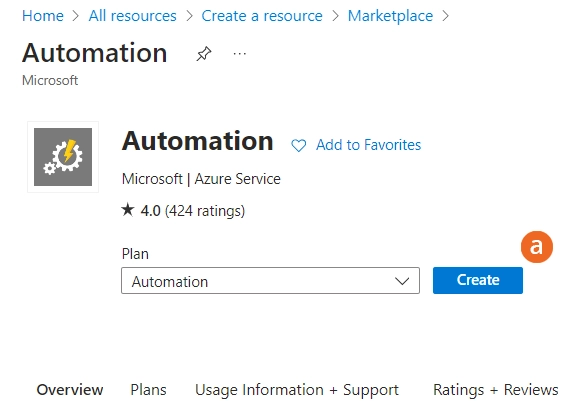
a.搜索 "自动化 "并点击 创建.
 (opens in a new tab)
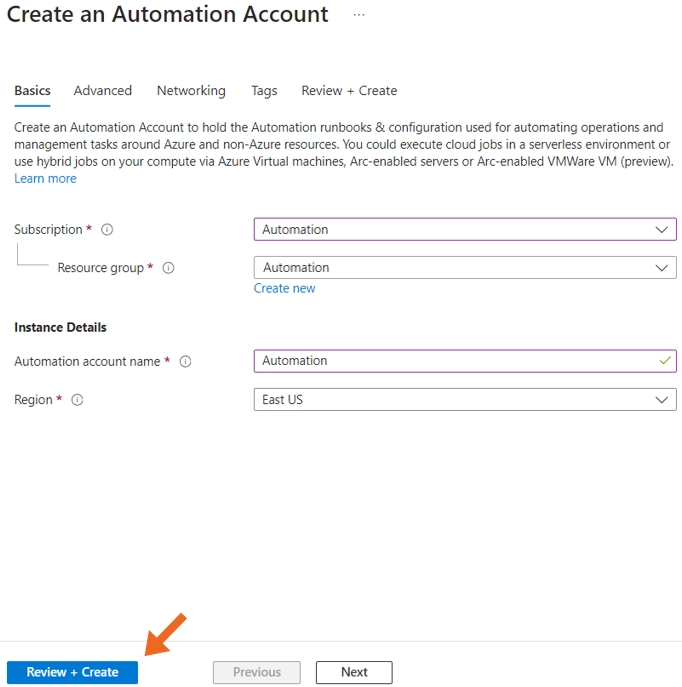
在自动化创建表单中填写所有必要字段,然后单击 创建
 (opens in a new tab)
b.导入 AzureAD 模块
c.为此,打开我们刚刚创建的自动化账户,选择 模块 位于共享资源下,选择 浏览画廊并搜索 AzureAD.

d.导入 AzureAD 模块,并等待进程成功完成。
2.创建 运行手册
a.导航至自动化账户,选择 运行手册然后点击 创建运行手册.
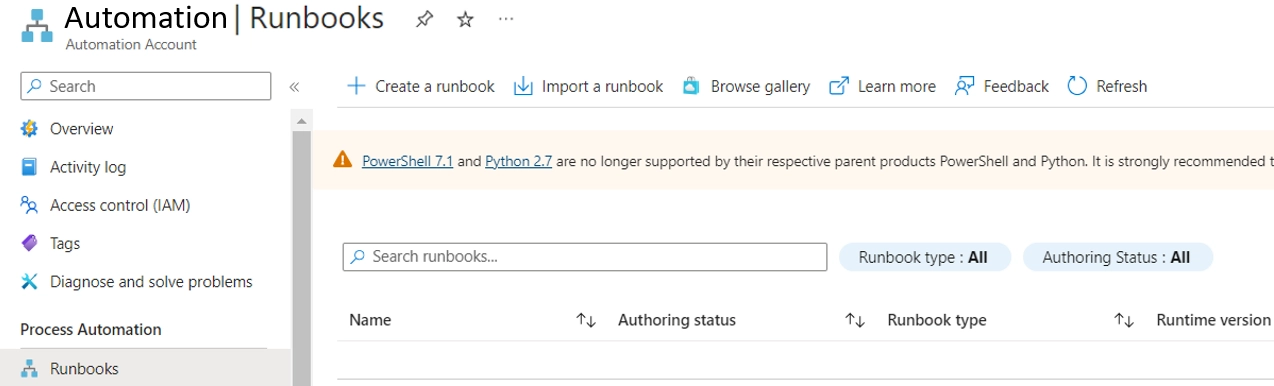
b.创建运行簿后,单击 编辑 并粘贴您的 PowerShell 脚本,然后点击 节省 和 出版.
3.下面的脚本可用于 将用户的访问权限提升至贡献者角色 并在出现任何错误时触发电子邮件。脚本首先会验证用户是否已为其希望获得高级访问权限的订阅分配了阅读器角色。如果没有,则会出错。如果用户已在请求的资源上拥有贡献者角色,也会出错。
突出显示的区域应根据您的环境细节进行调整。
参数 (     [参数(强制 = $true)]     [字符串] $订阅ID,
    [Parameter(Mandatory=true)] [string] 资源组名称,
    [Parameter(Mandatory=true)] [string] resourceName,
    [Parameter(Mandatory = true)]     [string] $resourceType,     [Parameter(Mandatory = true)]
    [string] $用户主名称,     [Parameter(Mandatory = $false)]     [string] $链接网址 )

$错误处理偏好 = "继续" $错误 = @()
function Send-Email($subject, $body, $to, $cc = $null, $isBodyHtml = $false) {
    $凭据 = Get-AutomationPSCredential -Name 'SMTP 中继'     $smtp服务器 =  smtp.example.com
    $smtpPort =  <Int32>
    $from =  'example@examplecompany.com'
$mailParams = @{
收件人 = $to
主题 = $subject
正文 = $body
SmtpServer = $smtpServer
凭证 = $credential
端口 = $smtpPort
UseSsl = $true
发件人 = $from
BodyAsHtml = $isBodyHtml
}
如果 ($cc) {
$mailParams['Cc'] = $cc
}
Send-MailMessage @mailParams -ErrorAction Stop
}
try {
$connection = Connect-AzAccount -Identity
} catch {
$errors += "使用托管身份验证 Azure 失败:$_"
}
try {
Set-AzContext -SubscriptionId $subscriptionId
} catch {
$errors += "设置 Azure 订阅上下文失败:$_"
}
$roleDefinitionName = "Contributor
$readerRoleDefinitionName = "读者
try {
$user = Get-AzADUser -UserPrincipalName $userPrincipalName -ErrorAction Stop
} catch {
$errors += "检索 UPN '$userPrincipalName' 的用户对象失败:$_"
}
# 检查用户是否具有订阅级别的阅读器角色
$readerRoleAssignment = Get-AzRoleAssignment -ObjectId $user.Id -RoleDefinitionName $readerRoleDefinitionName -Scope "/subscriptions/$subscriptionId" -ErrorAction SilentlyContinue
如果 (-not $readerRoleAssignment) {
    $noReaderRoleHtml = @"
    <h2>不担任读者角色</h2>

<p>用户 <strong>$userPrincipalName</strong> 没有 <strong>$readerRoleDefinitionName 角色定义名称</strong> 角色,并且不能添加到 <strong>$roleDefinitionName</strong> 资源的作用。</p>
"@
    $noReaderRoleHtml += $signature
  Send-Email -subject "Missing Reader Role" -body $noReaderRoleHtml -to $userPrincipalName -cc "itadministrator@examplecompany.com" -isBodyHtml $true
    返回
}

# 检查资源组是否存在
$resourceGroupExists = $true
$resourceGroup = Get-AzResourceGroup -Name $resourceGroupName -ErrorAction SilentlyContinue
如果 (-not $resourceGroup) {
    $errors += "资源组 '$resourceGroupName' 不存在"。
    $resourceGroupExists = $false
}

# 检查资源是否存在于资源组中
  $domain = "yourdomain.onmicrosoft.com" # 将其替换为实际的 AAD 租户域

# 使用名称和类型检查资源是否存在于资源组中
$resourceExists = $false
$resourceUrl = ""
如果 ($resourceGroupExists) {
    $resources = Get-AzResource -ResourceGroupName $resourceGroupName -ResourceType $resourceType -Name $resourceName -ErrorAction SilentlyContinue
    $resource = $resources | Where-Object { $_.ResourceType -eq $resourceType -and $_.Name -eq $resourceName }
    如果 ($resource) {
        $resourceExists = $true
        # 使用域、资源组、资源类型和资源名称构建 URL
        $resourceUrl = "https://portal.azure.com/#@$domain/resourcegroups/$resourceGroupName/providers/$($resource.ResourceType)/$resourceName" } 否则
    } else {
        $errors += "名称为'$resourceName'、类型为'$resourceType'的资源不存在于资源组'$resourceGroupName'中"。
    }
}

# 仅当资源组和资源存在时才尝试角色分配
如果 ($resourceGroupExists -and $resourceExists) {
    try {
        $roleAssignment = New-AzRoleAssignment -ObjectId $user.Id -RoleDefinitionName $roleDefinitionName -Scope $resource.ResourceId -ErrorAction Stop
    } catch {
        如果 ($_.Exception -match 'Conflict') {
            # 用户已拥有贡献者角色,发送特定电子邮件
            $alreadyContributorHtml = @"
<h2>用户已是贡献者</h2>

            <p>用户<strong>$userPrincipalName</strong>已经拥有<strong>$roleDefinitionName</strong>资源的作用<strong>$resourceName</strong>.</p>

            <p>资源 URL:<a>$linkUrl</a></p>

"@

$alreadyContributorHtml += $signature

  Send-Email -subject "User Already Has Contributor Role" -body $alreadyContributorHtml -to $userPrincipalName -cc "itadministrator@examplecompany.com" -isBodyHtml $true

} else {

$errors += "向用户'$userPrincipalName'分配角色'$roleDefinitionName'失败:$_"

}

}

}

$signature = @"

<p>致以最崇高的敬意</p>

<p><strong>您的 IT 团队</strong></p>

<p><em>这是一封自动发送的邮件,请不要直接回复此邮件。</em></p>

"@

如果 ($errors) {

$errorMessageHtml = "<h2>在 Azure 角色分配中检测到的问题</h2><ul>"

foreach ($errors 中的 $errorItem) {

$errorMessageHtml += "<li>$errorItem</li>"

}

$errorMessageHtml += "</ul>$signature"

  Send-Email -subject "Azure 角色分配问题" -body $errorMessageHtml -to $userPrincipalName -cc "itadministrator@examplecompany.com" -isBodyHtml $true

} elseif ($roleAssignment) {

# 角色分配成功,发送成功电子邮件

$successMessageHtml = @"<h2>角色分配成功</h2>

    <p>用户<strong>$userPrincipalName</strong>成功地分配了<strong>$roleDefinitionName</strong>资源的作用<strong>$resourceName</strong>.</p>

    <p>资源 URL:<a>$linkUrl</a></p>

"@

$successMessageHtml += $signature

  Send-Email -subject "Azure 角色分配成功" -body $successMessageHtml -to $userPrincipalName -cc "itadministrator@examplecompany.com"-isBodyHtml $true }
请注意,上面和下面的 PowerShell 脚本通常需要大约 5 分钟才能完成,因为 AzureAD 模块需要时间加载。
还需注意的是,在添加贡献者等新角色时,用户应注销并返回 Azure,或者使用隐身/私人窗口使新角色生效。
4.应创建第二个运行手册,以便在规定时间过后删除贡献者角色。
PowerShell 脚本的示例如下:
  param (     [Parameter(Mandatory = true)]     [string] subscriptionId,
    [Parameter(Mandatory=true)] [string] 资源组名称, [Parameter(Mandatory=true)] [string] 资源名称, [Parameter(Mandatory=true)] [string] 资源名称, [Parameter(Mandatory=true)] [string] 资源名称, [Parameter(Mandatory=true)] [string] 资源名称, [Parameter(Mandatory=true)] [string] 资源名称, [Parameter(Mandatory=true)] [string] 资源名称, [Parameter(Mandatory=true)] [string] 资源名称, [Parameter(Mandatory=true)] [string] 资源名称, [Parameter(Mandatory=true)] [string] 资源名称, [Parameter(Mandatory=true)] [string] 资源名称, [Parameter(Mandatory=true)] [string] 资源
    [string] $resourceName,     [Parameter(Mandatory = $true)]
    [string] $resourceType,     [Parameter(Mandatory = $true)]
    [string] $用户主名称,     [Parameter(Mandatory = $false)]     [string] $链接网址 )

$错误操作偏好 = "继续" $错误 = @() $签名 = @"


<p>致以最崇高的敬意</p>
<p><strong>您的 IT 团队</strong></p>
<p><em>这是一封自动发送的邮件,请不要直接回复此邮件。</em></p>
"@

function Send-Email($subject, $body, $to, $cc = $null, $isBodyHtml = $false) {

$credential = Get-AutomationPSCredential -Name "SMTP Relay
  $smtpServer = ' SMTP 服务器smtp.example.com'$smtpPort = <int 32>
  $from = 'example@examplecompany.com'$mailParams = @{         收件人        = $to
        主题    = $subject
        Body       = $body
        SmtpServer = $smtpServer        Credential = $credential
        端口       = $smtpPort
        UseSsl     = $true
        发件人 = $from
        BodyAsHtml = $isBodyHtml     }
    if ($cc) {         $mailParams['Cc'] = $cc     }
    Send-MailMessage @mailParams -ErrorAction Stop } try {     $connection = Connect-AzAccount -Identity } catch {
    $errors += "使用托管标识与 Azure 身份验证失败:$_" }

try {     Set-AzContext -SubscriptionId $subscriptionId } catch {
    $errors += "设置 Azure 订阅上下文失败:$_" }$roleDefinitionName = 'Contributor'

try {     $user = Get-AzADUser -UserPrincipalName $userPrincipalName -ErrorAction Stop } catch {
    $errors += "无法检索用户对象 '$userPrincipalName' 的用户主名称 (UPN):$_" }
不担任读者角色
# 检查资源组是否存在并获取资源
$resourceGroupExists = $resourceExists = $false
如果 ((Get-AzResourceGroup -Name $resourceGroupName -ErrorAction SilentlyContinue)) {
$resourceGroupExists = $true
$resources = Get-AzResource -ResourceGroupName $resourceGroupName -ResourceType $resourceType -Name $resourceName -ErrorAction SilentlyContinue
$resource = $resources | Where-Object { $_.ResourceType -eq $resourceType -and $_.Name -eq $resourceName }

如果 ($resource) {

$resourceExists = $true

} else {
$errors += "名称为'$resourceName'、类型为'$resourceType'的资源不存在于资源组'$resourceGroupName'中"。
}
} else {

$errors += "资源组'$resourceGroupName'不存在"。
}

# 如果资源组和资源存在,则尝试删除角色分配

if ($resourceGroupExists -and $resourceExists) {
尝试 {

$roleAssignments = Get-AzRoleAssignment -ObjectId $user.Id -RoleDefinitionName $roleDefinitionName -Scope $resource.ResourceId -ErrorAction SilentlyContinue

foreach ($roleAssignment in $roleAssignments) {

# 注意:如果 cmdlet 支持,则确认抑制将起作用。
Remove-AzRoleAssignment -ObjectId $user.Id -RoleDefinitionName $roleDefinitionName -Scope $resource.ResourceId -Confirm:$false

}

# 检查角色分配是否已成功删除
如果(-not (Get-AzRoleAssignment -ObjectId $user.Id -RoleDefinitionName $roleDefinitionName -Scope $resource.ResourceId -ErrorAction SilentlyContinue)) {

# 如果移除成功,发送成功电子邮件
$successMessageHtml = @"<h2>角色移除成功</h2>
            <p>用户<strong>$userPrincipalName</strong>已成功从<strong>$roleDefinitionName</strong>资源的作用<strong>$resourceName</strong>.</p>
            <p>资源 URL:<a>$linkUrl</a></p>
"@
$successMessageHtml += $signature
  Send-Email -subject "Azure 角色移除成功" -body $successMessageHtml -to $userPrincipalName -cc "itadministrator@examplecompany.com " -isBodyHtml $true
} else {
$errors += "删除尝试后,用户'$userPrincipalName'的角色'$roleDefinitionName'仍然存在"。
}

} catch {
$errors += "从用户'$userPrincipalName'移除角色'$roleDefinitionName'失败:$_"
}

}

if ($errors) {
$errorMessageHtml = "<h2>Azure 角色移除过程中检测到的问题</h2><ul>"
foreach ($errors 中的 $errorItem) {
$errorMessageHtml += "<li>$errorItem</li>"
}
$errorMessageHtml += "</ul>$signature"
  Send-Email -subject "Azure 角色移除问题" -body $errorMessageHtml -to $userPrincipalName -cc "itadministrator@examplecompany.com"-isBodyHtml $true }
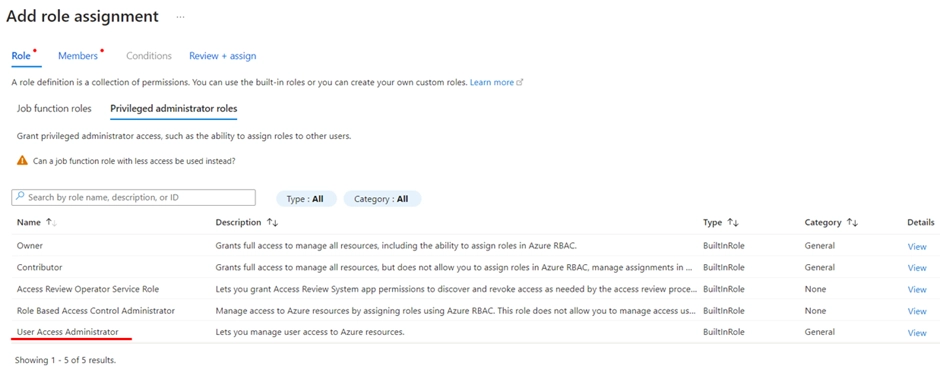
5.为每个订阅赋予自动化账户 "用户访问管理员 "角色
a.要运行 PowerShell 脚本,自动化账户必须具有用户访问管理员角色。
b.在 每份认购 您希望允许请求提升访问权限的位置。
c.在角色部分,选择 用户访问管理员 然后点击 下一个.
 (opens in a new tab)
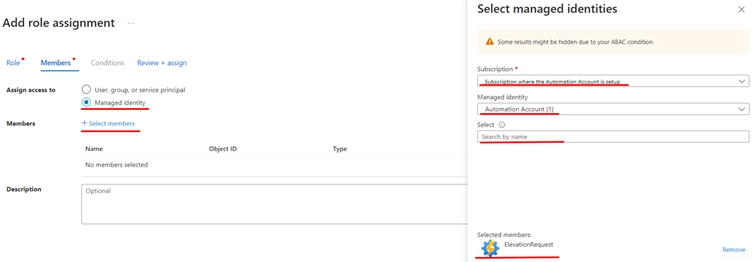
d.在 "成员 "部分,选择 管理身份 则 + 选择成员选择 订阅 在运行自动化账户的地方,在 "选择 "字段中选择受管身份和成员。
e.选定的成员将显示在屏幕底部,然后点击 选择 和 审查 + 分配.
 (opens in a new tab)
f.自动化账户企业应用程序现在将在订阅中显示为具有用户 "访问管理员 "角色。 访问控制(IAM)
 (opens in a new tab)
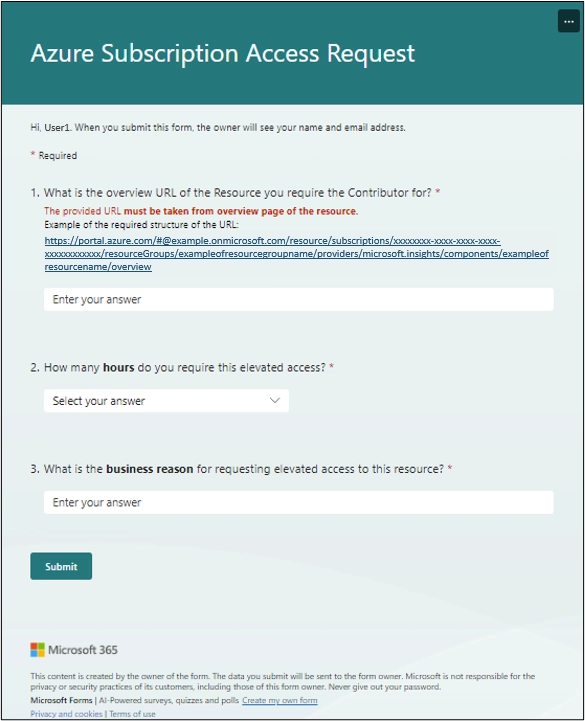
6. 创建一个 Microsoft 表单,要求提供资源的 URL 以及根据业务需要所需的任何其他信息。在下面的示例中,我们将询问业务原因和需要提升资源访问权限的小时数,最多可从下拉列表中选择 8 小时。
 (opens in a new tab)
7.设置一个 保安组 in 办公室行政
a.指定允许提出高级访问请求的成员。(可选但强烈建议--如果不想执行此安全检查,请继续下面的流程创建--步骤 9)
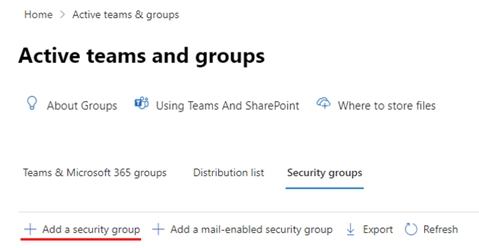 (opens in a new tab)
b.创建安全组后,记下 URL 中的安全组 ID。例如,安全组 ID 是此处的 GUID:
https://admin.microsoft.com/Adminportal/Home#/groups/:/GroupDetails/XXXXXXXX-XXXXXXX-XXXXXXX-XXXXXXX/1
8.在 portal.azure.com 注册应用程序
a. 授予管理同意书 至以下内容 微软图表 带类型的 API 权限 应用:
-
-
- 目录.读取.全部
- 小组。阅读全部
- 用户全部阅读
-
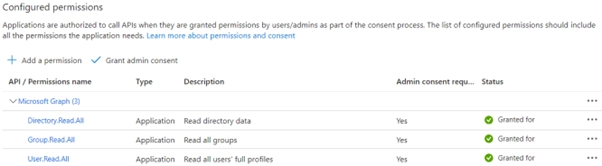 (opens in a new tab)
b.创建一个 客户秘密 并注意到 租户编号,该 应用程序(客户端)ID 和秘密 价值 为 "流"。
 (opens in a new tab)
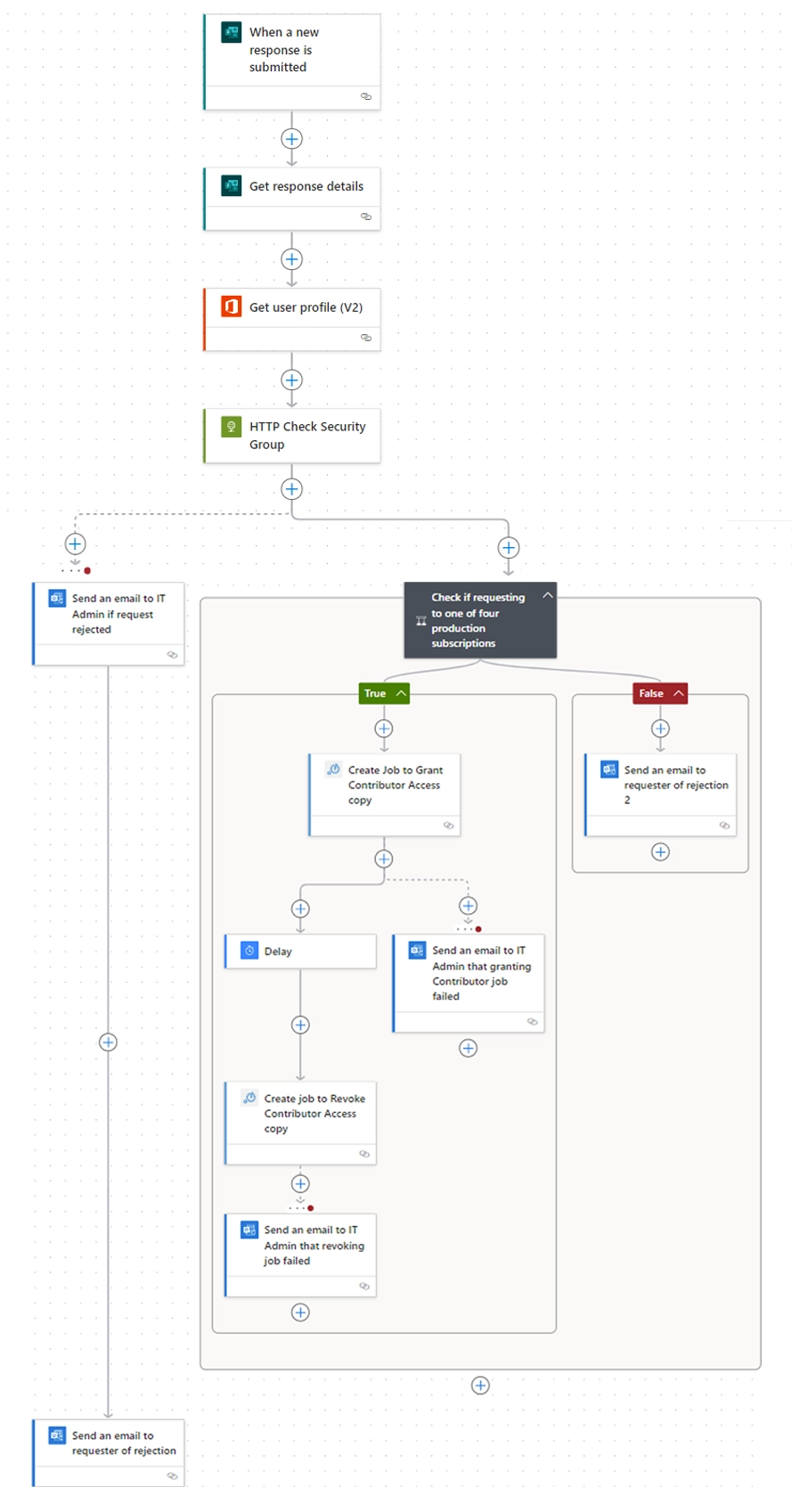
8.现在设置一个流程来处理表单数据并执行 PowerShell 脚本:
a. Microsoft Forms 触发器 – 当提交新回复时
b. Microsoft Forms 操作 – 从触发器 responseId 中获取响应详情
c.如果跳过了安全组建议,请执行以下步骤 10
I.使用触发应答器作为用户(UPN),获取用户配置文件 (v2)
II.要验证用户是否属于安全组,请向以下 URI 创建 HTTP GET 请求:https://graph.microsoft.com/v1.0/groups/XXXXXXXX-XXXXXXX-XXXXXXX-XXXXXXXXX/transitiveMembers?$filter=id eq 'outputs('Get_user_profile_(V2) ')?['body/id']'&$select=id
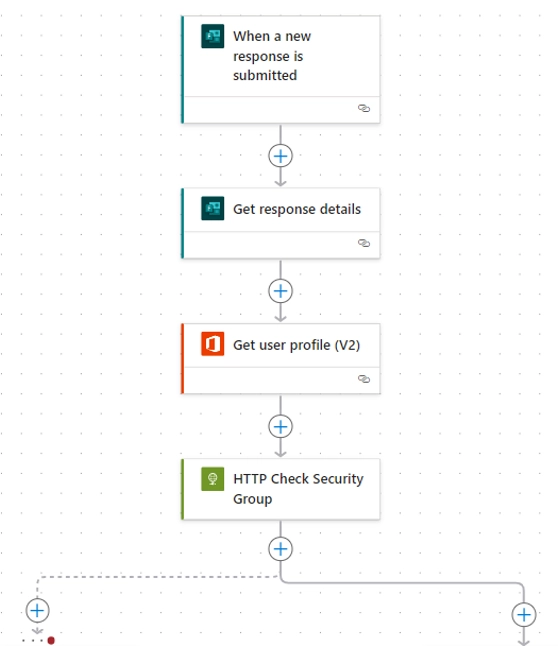 (opens in a new tab)
III.在 HTTP GET 请求中,展开 "身份验证 "并确保 "身份验证类型 "为 活动目录 OAuth观众是 https://graph.microsoft.com/在 Azure 中注册应用程序时的注释值已添加到相应字段:
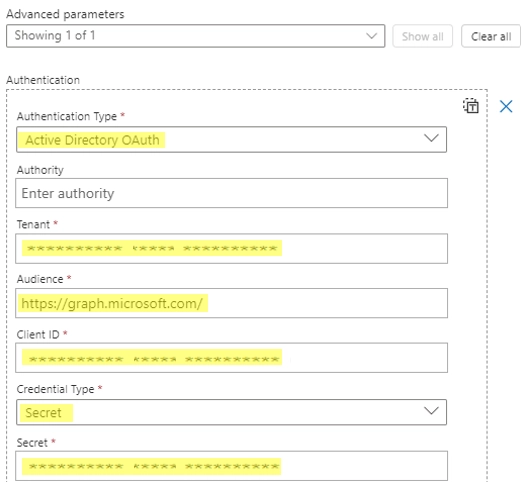 (opens in a new tab)
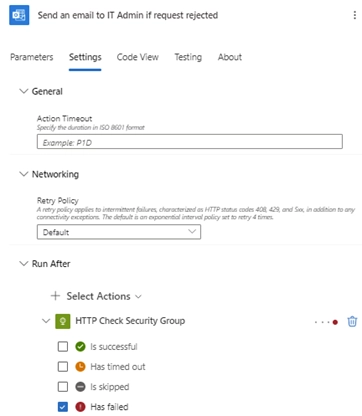
IV.如果安全组验证无法获得记录,则会在请求被拒绝时向 IT 管理员发送电子邮件。然后会向请求者发送一封电子邮件,通知他们不属于安全组,无法提出此类请求。
 (opens in a new tab)
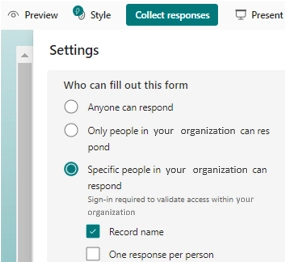
V.值得注意的是,上述安全检查也可以直接在 Microsoft 表单的访问权限中进行管理,但安全组是更安全的解决方案,需要的维护更少:
 (opens in a new tab)
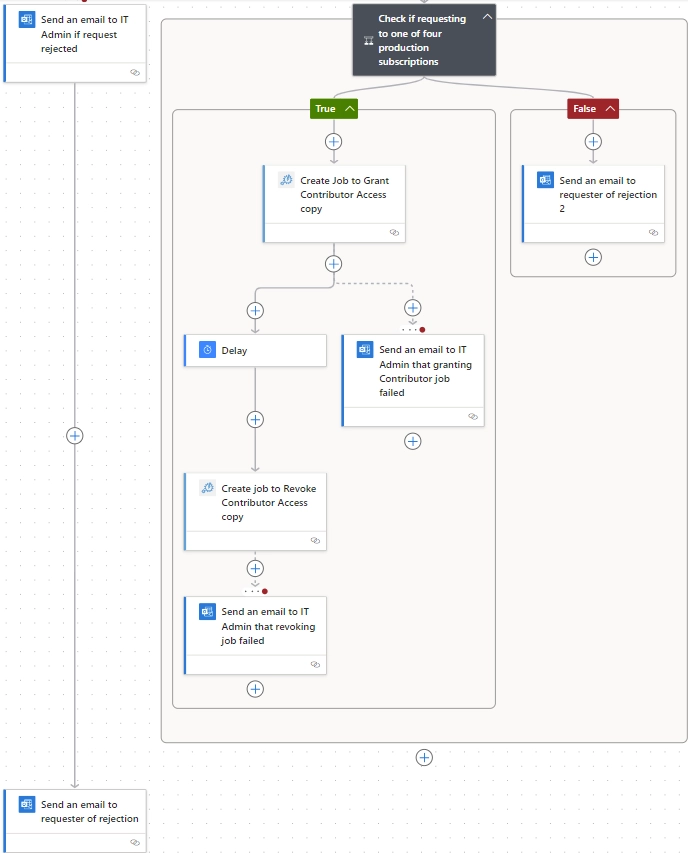
10.创建一个条件,检查为获得高级访问权限而提供的 URL 是否在允许他们申请高级访问权限的订阅列表中。
 (opens in a new tab)
a.要解析所提供 URL 中的订阅,请使用以下表达式,替换突出显示的指向表单 URL 字段的 Get_response_details 值:
first(split(last(split(body('Get_response_details')?['URLfieldID'],'/resource/subscriptions/')),'/resourceGroups/'))
b.如果 URL 是用于未列出的订阅,则向提交者发送拒绝电子邮件
c.如果 URL 列表中包含订阅,请继续创建 Azure Automation 作业
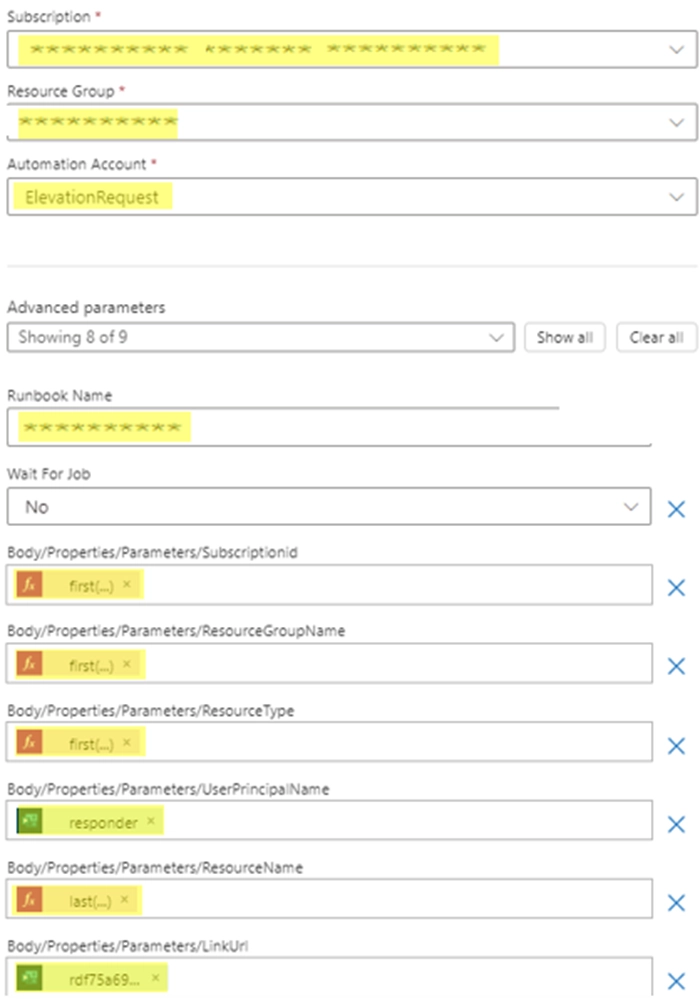
11.在 Azure Automation 操作中,确保填写所有高亮显示的值,并指向授予 Contributor 高级访问权限的运行本。
a.订阅 = 运行本所在的订阅
b.资源组 = 运行本所在的资源组
c.自动化账户 = 之前设置的自动化账户 b
d.运行本名称 = 要授予贡献者角色的运行本名称
e.选择运行手册后,PowerShell 脚本中的参数将弹出,供您添加所需的详细信息。从提交表单时提供的 URL 中解析这些信息:
I.订阅Id
first(split(last(split(body('Get_response_details')?['URLfieldID'],'/resource/subscriptions/')),'/resourceGroups/'))
II.资源组名称
first(split(last(split(body('Get_response_details')?['URLfieldID'],'/resourceGroups/')),'/providers/'))
III.资源组名称
first(split(first(split(last(split(body('Get_response_details')?['URLfieldID'],'/providers/')),concat('/',last(split(body('Get_response_details')?URLfieldID'],'/'))))),concat('/',last(split(first(split(last(split(body('Get_response_details')?['URLfieldID'],'/providers/')),concat('/',last(split(body('Get_response_details')?URLfieldID'],'/'))))),'/')))))
IV.用户校长姓名
body('Get_response_details')?['responder']?
V.资源名称
last(split(first(split(last(split(body('Get_response_details')?['URLfieldID'],'/providers/')),concat('/',last(split(body('Get_response_details')?URLfieldID'],'/'))))),'/'))
VI.链接网址
body('Get_response_details')?['URLfieldID']
 (opens in a new tab)
12.在本例中,我们允许用户定义他们需要多长时间的高架访问。在 "延迟 "中,"计数 "由表单字段中提供的小时数定义,而 "单位 "是 "小时"。
13.延迟后,我们创建一个新的 Azure Automation 操作,这次指向运行本,删除用户在该特定资源上的贡献者角色。
a. 这些字段与授予贡献者角色的字段以及相应参数的解析相同。
有几个想法可以改编或添加到 "流动 "中,我们就不一一赘述了:
- 使用内部票务系统作为触发器,而不是 Microsoft 表单
- 允许用户根据自己的需要选择资源组和/或订阅级别的访问权限。请注意,这样做时某些解析表达式会发生变化。
- 添加发送给有能力批准或拒绝申请的个人或小组的审批流程。

Connecting Software的首席运营官
作者:
我是Connecting Software的首席运营官,负责管理我们各个地点的日常运营。我对持续改进和提高效率充满热情。如果你想加入我们在斯洛伐克或马德拉的优秀团队,请联系我们。
网上有更多信息吗?
请查看我们博客上关于Exchange服务器同步的其他文章: