マイクロソフト365
事業継続
Choose the workloads そして 利用者 to protect, from email alone to calendars, contacts, documents, and chats. Compare the three supported architectures for keeping current copies in an independent standby environment with near-real-time synchronization
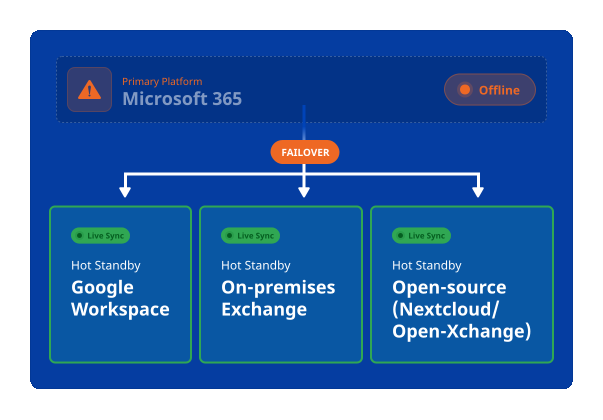
What Happens When Microsoft 365 Goes Down?
A Microsoft 365 outage can quickly affect more than IT infrastructure. Employees may lose access to essential emails, calendars, contacts, documents, and collaboration tools. Customer support is interrupted, approvals delayed, invoices left unattended, and critical business processes put on hold.
Even a temporary disruption can affect productivity, customer relationships, revenue, and operational resilience.
Communication Stops
Employees may lose access to email, calendars, contacts, and essential communication tools.
Critical Processes Pause
Workflows that depend on Microsoft 365 data and services can be delayed or placed on hold.
Customer Support Is Interrupted
Service teams may be unable to access messages, documents, and customer information.
Approvals Are Delayed
Decisions, requests, and time-sensitive approvals may remain unattended.
Invoices Remain Unattended
Finance and administrative processes can be disrupted when messages and documents are unavailable.

バックアップ
Restore data later
Backups are essential for protecting business data, but recovering data does not necessarily mean restoring business operations immediately. Traditional recovery can take time to restore information, provision services, and make systems accessible again.
事業継続
Switch to a ready environment now
A continuity strategy prepares an alternative environment before an incident occurs, keeping critical business information synchronized and ready for use.
The Solution? Microsoft 365 Business Continuity Suite
The Microsoft 365 Business Continuity Suite by Connecting Software is an all-in-one business continuity solution for organizations using Microsoft 365.
Get a hot standby environment for the workloads you select, helping critical users continue working when Microsoft 365 is unavailable.
Choose the scope that fits your organization
Protect all users or select only the users and teams considered critical to continued operations.
電子メールの継続性
Keep supported email, contacts, calendars, and tasks synchronized and available in the standby environment.
Document Continuity
Keep selected files synchronized and available so users can access supported documents during an outage.
Conversation Continuity
Make supported conversation history and supported new chats available through the selected standby platform.
Fully Customer-Controlled Deployment
Run data processing on your servers alone. With a fully self-hosted deployment, no processing is required on Connecting Software or third-party servers.
Three Architectures to Ensure Microsoft 365 Business Continuity
There is no single standby architecture that fits every organization. Choose an architecture based on the Microsoft 365 services you need to keep availableには level of independence required, your preferred hosting model, and your data-location 要件

Google Workspace ホットスタンバイ
Best for cross-cloud independence and broad workload coverage
Use Google Workspace as a separately operated continuity environment for supported email, calendar, contact, file, and conversation data.
Consider this architecture when:
- You want the standby in a different hyperscale cloud
- You need continuity beyond email
- Users are comfortable working temporarily with Google applications
- Cross-platform administration is acceptable

Microsoft On-Premises Standby
Best for mailbox continuity with infrastructure control
Operate Exchange Server on-premises, in a private cloud, or through an independent hosting provider. Additional platforms are required if files and conversations must also remain available.
Consider this architecture when:
- Email is the primary continuity requirement
- Users should retain familiar Outlook and Exchange workflows
- Your organization can operate or outsource Exchange infrastructure
- You need direct control over hosting and data location

Open Source Standby - Nextcloud and Open-Xchange
Best for hosting flexibility, file continuity, and vendor diversity
Use Nextcloud for synchronized files and Nextcloud Talk for supported conversation continuity. Open-Xchange can be used for email and calendar continuity.
Consider this architecture when:
- You prefer an open-source-based platform strategy, for cost reasons or others
- You prioritize self-hosting or hosting-provider choice
- Data location is a significant requirement
- Files and conversations are the initial continuity priority
Which Microsoft 365 Business Continuity Strategy Is Right for You?
| 基準 | Google Workspace | Self-hosted Exchange | Open Source |
|---|---|---|---|
| 特に適しているのは | Broad cross-cloud continuity | Mailbox-focused continuity and control | Flexible hosting and open-platform strategy |
| Hosting model | Independent cloud provider | On-premises, private cloud, or hosted VM | Self-hosted or managed hosting |
| User experience | Different productivity platform | Familiar Exchange and Outlook model | Nextcloud web, desktop, and mobile clients |
| Microsoft-cloud independence | High, subject to identity and integration design | Depends on hosting and identity design | Depends on hosting and identity design |
| Infrastructure responsibility | Primarily SaaS administration | Exchange infrastructure and operations | Nextcloud infrastructure and operations |
Not sure which approach fits your organization?
Our team can evaluate your Microsoft 365 environment and continuity requirements to identify the most appropriate solution.
Before, During, and After a Microsoft 365 Outage
Before the Outage
During the Outage
After the Outage
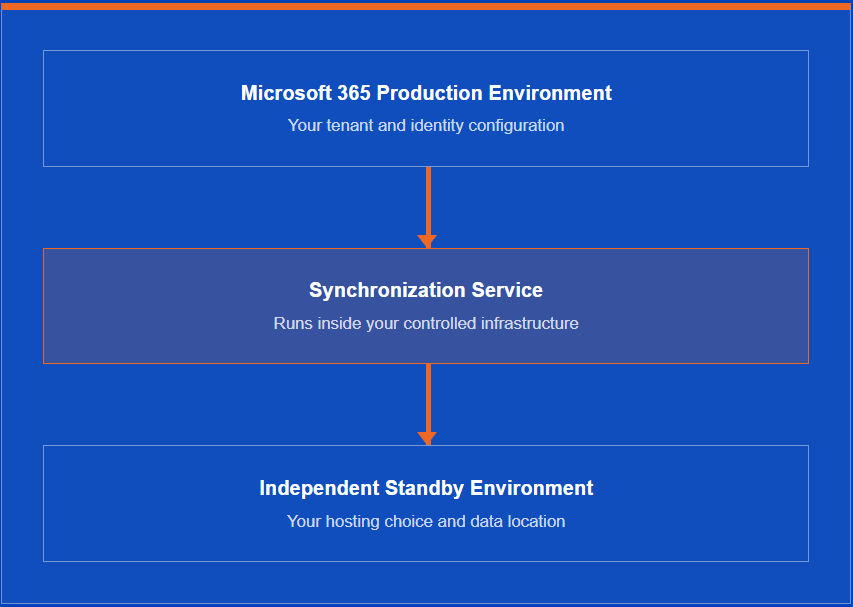
Deploy Microsoft 365 Continuity Entirely Within Your Environment
Run the synchronization service and standby infrastructure where your security, governance, and data-location requirements demand. Available models include shared SaaS, dedicated SaaS, and self-hosted deployment.
- Control the data-processing location
- Select protected workloads and users
- Define synchronization scope
- Retain control over continuity procedures
Flexible Microsoft 365 Business Continuity Pricing
Microsoft Exchange and Outlook
Emails, calendars, contacts and tasks
SharePoint and OneDrive
Documents and Files
マイクロソフトチームズ
Collaboration and chat
Shared SaaS
A shared, managed cloud environment
Dedicated SaaS
A dedicated managed environment for your organization
Self-hosted
Deploy the solutions within your own infrastructure
REAL-TIME SYNC
- Self-hosted
- 1001+ users
- 12ヶ月契約
Prepare before disruption
Don't let a Microsoft 365 Outage Stop Your Business
Choose a business continuity strategy that fits your infrastructure, security requirements, and operational needs. Connecting Software helps you prepare for disruptions before they happen.
Three alternatives. One business continuity partner.
よくあるご質問
この「よくある質問」の中にお探しの質問が見つからない場合は、以下をご覧ください。 連絡する.
興味がありますか?もっと見る
信頼と認定