
TL;DR – Executive Summary
Cold backups are used to restore Microsoft 365 data after disruption. But while the restore runs, the business is stopped. That is the part most continuity plans get wrong.
The organizations that stay operational during an outage do not wait for recovery. They fail over to a hot backup on an independent platform, Google Workspace being one practical example, and they keep running while Microsoft sorts itself out.
Bottom line: When Microsoft goes down, a hot backup keeps email, calendars, and collaboration running without waiting for a restore. This article is about how that architecture works and how to build it before you need it.
Want to skip right into how Microsoft 365 and Google Workspace can run in parallel for continuity?
Explore Google synchronization solutions from Connecting Software that are the technology layer that makes the Google Business Continuity Plus SKU work.
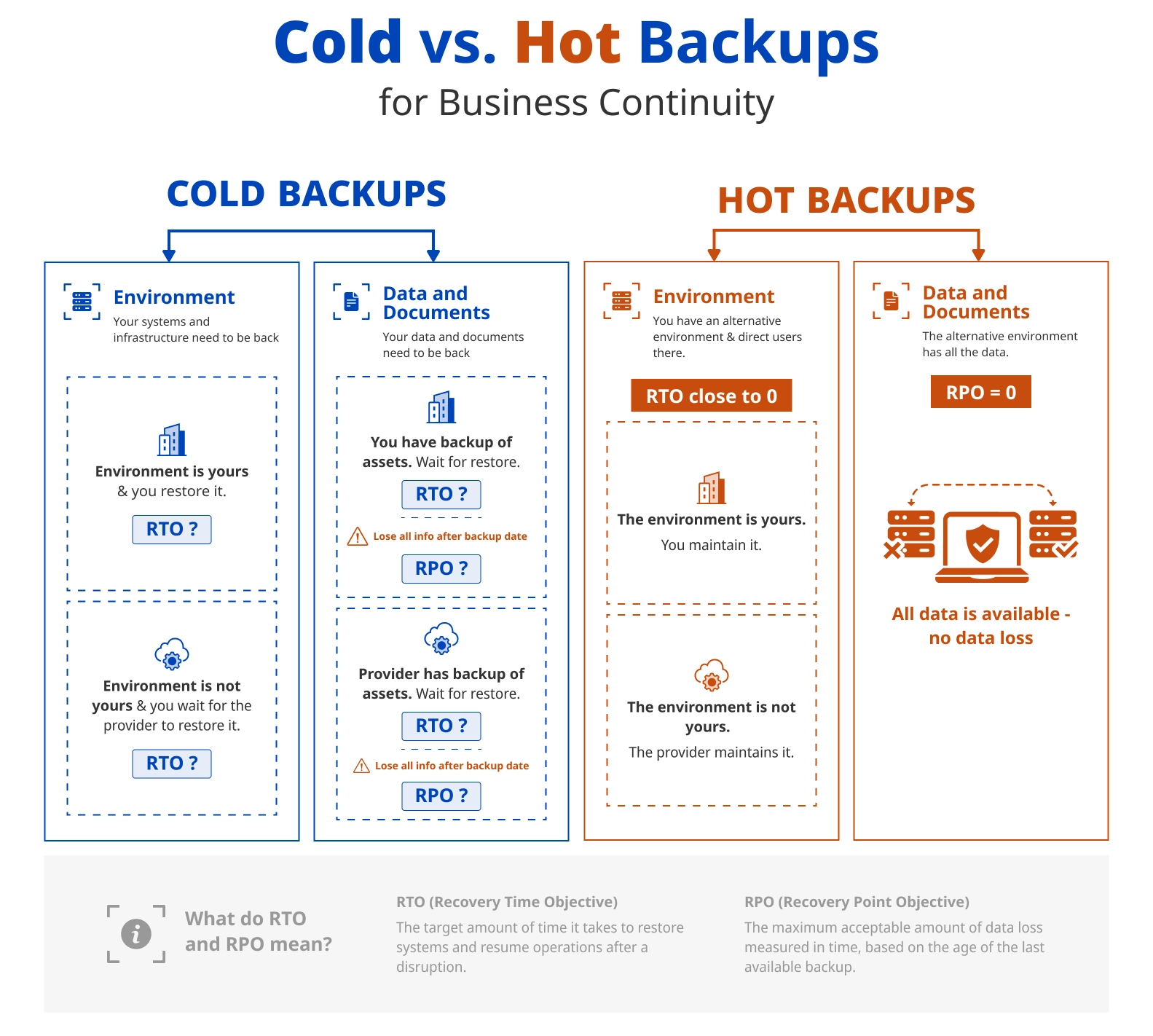
Unlike in database replication architecture, in a business continuity context, a hot backup is a continuously synchronized alternative environment that users can switch to immediately during a disruption. A cold backup refers to an offline or disconnected copy of your data that you can use to restore documents and data to a specific point, but only once the primary environment is available again.
Hot Backup vs. Cold Backup: Recovery Is Not Continuity
Cold backup gets you back to yesterday. It does not get you through today.
While a restore runs, your team is idle and your customers are waiting. And with SaaS platforms like Microsoft 365, the restore cannot even begin until the platform itself is back online, meaning your recovery timeline is entirely at Microsoft's discretion, not yours. That is not a backup problem. It is an architecture problem.
The organizations that stay operational during an outage do it differently. Their plan does not involve disaster recovery, but rather having a live alternative that users can actually work on.
Microsoft 365 Outages Are Not an Edge Case
In October 2025, Teams, Exchange Online, and the Microsoft 365 admin center went down, with thousands of users reporting impact. In January 2026, a separate incident took out Outlook, Defender, and Purview, with Microsoft citing traffic processing failures in its North America infrastructure. At peak, 15,000 reports flooded Downdetector. Recovery took nearly ten hours.
Two Major Outages. Twelve Months. Thousands of Users Affected.
This is not a criticism of Microsoft. At the scale they operate, incidents happen. At the scale they operate, incidents are inevitable. What is not inevitable is your business grinding to a halt when one happens.
For organizations where a communication blackout means delayed emergency response, suspended critical operations, or worse, the continuity challenge runs even deeper. We cover that specifically in the article The Gap Between Having a Backup Plan and Real Business Continuity.
How to Get a Live Continuity Layer for Microsoft 365
Some organizations respond to this risk by doubling down on Microsoft redundancy, running a second tenant, or leaning on Azure failover options. That approach protects against infrastructure failure but does not protect against platform-level incidents, which is exactly what both the 2025 and 2026 outages were.
There are two realistic paths to a hot backup of Microsoft 365 on an independent platform.
- The first is Microsoft Exchange on-premises. It is independent, it is proven, and it gives you full control. It will also put you back in the business of patching servers, managing infrastructure, and owning every failure (even at 2 am).
- The second is an independent SaaS ecosystem, in which the platform manages itself (yes, someone else's problem). Google Workspace is the most practical choice here. It is mature, widely adopted, and deeply integrated with enterprise workflows. The functional overlap with Microsoft 365 is significant, and many users are already familiar with Gmail, Google Calendar, and Google Drive from their personal lives. When a failover happens, users just open a browser and get to work.
When services are restored, users keep working and don’t even need to think about what to bring back to Microsoft 365. Data and documents come back automatically, and users just switch back to their primary environment.
No manual intervention. No productivity cliff. No migration disruption. Just a second platform doing its job quietly in the background.
Bottom Line on Microsoft 365 Continuity
Cold backups protect yesterday's data. Hot backups protect today's operations. For organizations operating under NIS2, DORA, or NIST frameworks, the distinction is even more crucial. Continuity is a compliance requirement with real consequences.
NIS2 mandates that essential and important entities maintain business continuity during incidents, not just the ability to restore afterward. Non-compliance exposes organizations to fines of up to €10 million or 2% of global annual turnover, whichever is higher, plus personal liability for senior management.
DORA requires financial entities to demonstrate operational resilience, including the capacity to sustain critical functions during ICT disruptions. Supervisory authorities can impose remediation orders, public censure, and financial penalties. More critically, they can restrict or suspend operations until compliance is demonstrated.
NIST SP 800-34 frames continuity as a core organizational capability, not a backup policy. For US federal agencies and their contractors, failure to meet continuity requirements can result in loss of authorization to operate.
The frameworks differ in scope and jurisdiction. The message is the same: when a platform incident disrupts operations, backup alone is not a defense.
When Microsoft 365 goes down and your team cannot email, access files, or coordinate, the consequences are concrete and regulators are watching. SLAs get missed. Customers escalate. Audits get triggered. In high-stakes environments — hospitals, financial institutions, utilities, emergency services — decisions cannot be made because the people who need to make them cannot communicate.
Having a backup is necessary. Having a cold backup is not sufficient for real business continuity.
Find out how to achieve a hot backup with Connecting Software Google Synchronization solutions
More on Business Continuity & Disaster Recovery
About the Author

By Ana Neto, technical advisor at Connecting Software.
“I have been a software engineer since 1997, with a more recent love for writing and public speaking. Do you have any questions or comments about this article? I would love to have your feedback, leave a comment below!"
