
TL;DR – Executive Summary
"Email continuity" means different things to different people. Historically, it wasn't something most organizations lost sleep over. If you asked an Exchange or Microsoft 365 admin years ago, they would tell you that email disruptions resolved themselves, and they would not be wrong. Microsoft's infrastructure is genuinely good, SMTP queues mail, and most outages are short-lived.
That's no longer the full picture. Even if the outages are not long, the question is no longer just:
“Will email eventually arrive?”
Instead, it has become:
“Can the organization continue operating while there is no email?”
Any Microsoft 365 outage has an effect in lost productivity, delayed communication, and missed business opportunities, and this effect is especially visible in large oragnizations.
Plus, compliance frameworks like NIS2, DORA, and SOC 2 are reinforcing this shift towards business continuity. Such frameworks are part of a broader regulatory trend that pushes organizations beyond backup and recovery and toward maintaining operational capability during outages, cyber incidents, and service disruptions.
Want to skip right into how Google Workspace running in parallel with Microsoft 365 can enable business continuity?
Backup Protects Data. Email Continuity Supports Operational Resilience.
When you thought of a Microsoft 365 backup solution, you would normally be concerned with recovering data after an incident.
Email continuity solutions, on the other hand, are designed to keep communication, calendars, and collaboration operational during the incident.
That distinction matters during:
- Microsoft 365 outages,
- tenant lockouts,
- ransomware events,
- identity failures,
- or cyberattacks.
The real question is:
How can users continue operating while the primary environment is unavailable?
This is also where two metrics that any BCP/DR conversation eventually lands on become useful: RTO and RPO.
In a traditional backup discussion, RTO is usually measured as the time needed to restore the affected system or data, while RPO reflects the age of the restore point (in other words, how much recent data may be missing).
In an email continuity discussion, the same metrics are often applied at the business-function level: RTO asks how long the organization can tolerate before users can communicate again, and RPO asks how current the standby communication environment needs to be.
That distinction matters for NIS2, DORA, SOC 2, and similar resilience and compliance discussions because the question is whether the business function can continue during the disruption.
Comparing Microsoft 365 Email Continuity Approaches
Once the requirement shifts to “keep people communicating during the disruption,” the architectural questions for IT become much more interesting.
Is a lightweight emergency mailbox service enough? Do we need to consider different regions? Should we use our own on-premises infrastructure?
There are multiple approaches and trade-offs to consider to achieve the level of continuity the business actually needs. The table below compares the main approaches, which we will examine in more detail below.
| Approach | Main Idea | Example tools and vendors | Strengths | Typical Concerns |
|---|---|---|---|---|
| Cloud-Based Continuity Services | Emergency continuity platform hosted by a third party | Mimecast, Retarus, Trend Micro | Fast deployment Lower operational overhead |
Limited continuity beyond emergency webmail |
| Second Microsoft 365 Tenant | Separate Microsoft 365 environment prepared for failover | Microsoft 365 | Familiar Microsoft ecosystem Cloud-native architecture |
Same-vendor ecosystem dependency, concentration risk |
| Exchange Server On‑Premises | Independent Exchange environment synchronized with Microsoft 365 | Microsoft, CB Exchange Server Sync | Operational independence and control Familiar Microsoft ecosystem for end users |
Additional infrastructure and maintenance |
| Google Workspace as a Hot Standby | Independent Google Workspace environment synchronized with Microsoft 365 | Google Workspace Business Continuity, CB Exchange Server Sync for Google Workspace | Cross-cloud independence Can be extended to SharePoint/ Google Drive |
Different user experience, identity, and mapping |
The right model depends on the organization's operational risk profile, compliance obligations, and tolerance for downtime. Let’s look at each option in further detail.
Option 1: Cloud-Based Email Continuity Services
This is one of the traditional approaches. Vendors such as Mimecast, Retarus, and Trend Micro provide cloud-based continuity platforms offering emergency mailbox access, mail routing, and temporary communication services.
The advantages are fast deployment and lower operational overhead.
However, enterprise teams often question how much real operational continuity these platforms provide beyond temporary webmail access. Can users still coordinate calendars, work with shared mailboxes, and return cleanly to Microsoft 365 after the incident?
Option 2: Secondary Microsoft 365 Tenant
Some organizations use a secondary Microsoft 365 tenant for failover, sometimes in a different region, to reduce exposure to regional service disruptions.
This can improve resilience, especially if the secondary tenant is designed with separate administration, routing, access policies, and recovery procedures. However, cross-region does not remove the broader dependency on the Microsoft cloud ecosystem.
There is a subtler issue too: if the secondary tenant authenticates through the same identity provider as production (commonly the same Entra ID tenant), then an identity-based incident or outage can affect both environments at once.
Option 3: Exchange Server On-Premises Synchronized with Microsoft 365
A third approach is maintaining an independent Exchange Server environment synchronized with Microsoft 365.
One example is using Exchange Server on-premises synchronized with Microsoft 365.
In this model:
- Microsoft 365 remains the primary operational platform,
- Exchange Server is the independent continuity environment,
- CB Exchange Server Sync for BCP by Connecting Software ensures synchronization between them.
Synchronization can include:
- mailboxes,
- calendars,
- contacts,
- public folders,
- distribution groups,
- and GAL synchronization.
Because this environment runs on-premises with its own Active Directory, it doesn't have to share an identity plane with the Microsoft 365 tenant. That's a meaningful distinction from option 2: an identity-based attack against the cloud tenant doesn't automatically extend to the on-premises Exchange environment, which matters directly for the "identity failures" and "tenant lockout" scenarios listed above.
Running on-premises also means this is the best fit if your organization needs this type of solution in an air-gapped network. The on-premises version can be used in conjunction with data diodes to enable that scenario.
Why Some Organizations Prefer This Architecture
For organizations with stronger operational resilience requirements, this approach can provide:
- operational independence from Microsoft 365,
- familiar Outlook and calendar continuity,
- greater control over infrastructure and failover,
- support for regulated or isolated environments,
- identity independence from the production tenant,
- and reduced cloud concentration risk.
Organizations that also depend on SharePoint and document collaboration may additionally implement document synchronization strategies using Secure Sync for SharePoint by Connecting Software for secure SharePoint synchronization across independent or isolated environments.
Option 4: Google Workspace as a Hot Standby
A fourth approach follows the same logic as Option 3, but swaps the standby platform: instead of Exchange Server on-premises, the independent environment is Google Workspace, kept continuously synchronized with Microsoft 365 via .
This gives organizations a cross-cloud failover option with no dependency on the Microsoft ecosystem at all. This can matter for concentration-risk concerns and is also popular with organizations already running parts of their operations on Google Workspace. Even for those who don’t, users are often familiar with Google Workspace through personal experience, which is helpful during failover.
We'll unpack this architecture, its identity model, and its specific trade-offs in a follow-up article.
Find out how to achieve a hot standby with Google Workspace for Business Continuity by Connecting Software
Failover: Removing the Restore Window
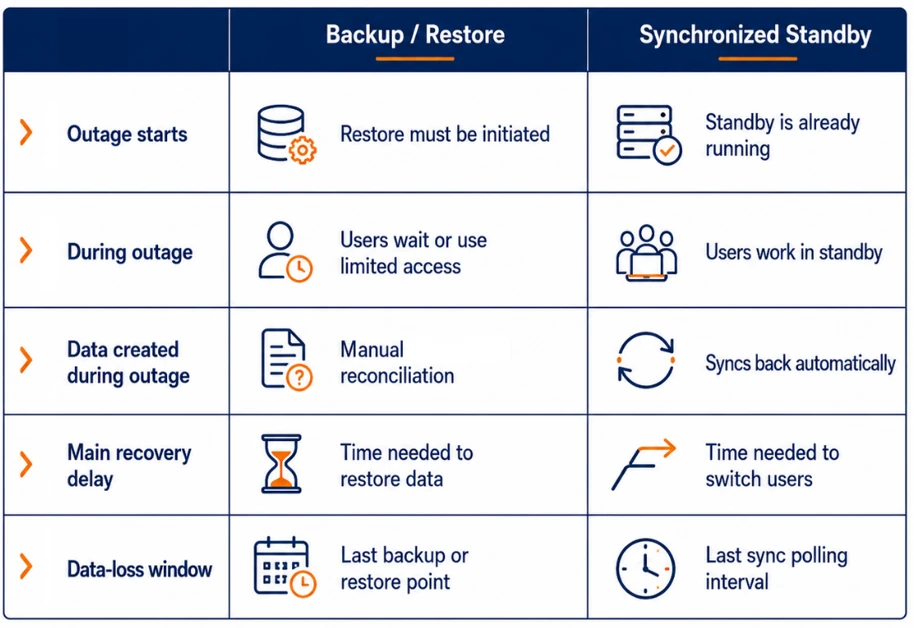
The traditional backup-and-restore approach meant that when disruption hits, someone still has to run a restore before anyone can work again.
That has two problems: the manual intervention required and the time the restore takes, which is proportional to the data that needs to be restored. For large tenants, it is not uncommon to have RTOs measured in days.
Cloud-based email continuity services are a workaround for this but provide limited capabilities.
A synchronized standby environment removes that step. Because you have a continuously updated copy of mailboxes, calendars, and eventually documents, users can simply be pointed at it and keep working. It’s a failover with no restore window. in place and current, which removes the restore window from the RTO calculation.
You will have to weigh that cost against the cost of not having e-mail, calendar, and other mailbox content available to your users, in terms of lost productivity, deals not completed and compliance costs when applicable.
Failback: Avoiding Manual Reconciliation
Failover is only half the story. At some point, the primary environment comes back online, and users need to move back. This is the failback stage, where the real question is what happens to mail sent and received, calendar changes, and document edits done in the standby environment, without losing data or creating duplicates.
Will new emails, calendar changes, and edited documents have to be manually reconciled back into production? This is no one’s favorite job because it is exactly the kind of manual step that introduces errors, version confusion, and delays.
With bi-directional sync, that reconciliation happens automatically: changes made during the outage flow back to Microsoft 365 without IT intervention once the primary environment is restored. The only data at risk is whatever changed within the most recent sync polling interval, the gap between one synchronization pass and the next. If the interval is five minutes, the practical RPO is roughly five minutes' worth of changes, not the full duration of the outage. You can time the failback according to your polling interval to achieve a reduction of RPO to zero
It is worth noting that there is a trade-off to the polling interval: shortening it lowers RPO but ; lengthening it reduces overhead but widens the potential data-loss window.
There is no single “correct” email architecture.
The right solution depends on:
- operational dependency on Microsoft 365,
- acceptable downtime,
- regulatory requirements,
- internal IT capabilities,
- and operational resilience goals.
Organizations with moderate requirements may be fully satisfied with cloud-based continuity services.
Organizations operating under NIS2, DORA, or with strong resilience requirements may need stronger operational independence and failover capabilities.
Final Thoughts
Microsoft 365 delivers excellent availability.
But availability alone does not guarantee operational resilience.
Organizations increasingly recognize that email continuity, calendar access, and collaboration continuity are essential for maintaining operations during disruption.
Because during a real outage, the most important question is not:
“Can we recover later?”
It is:
"Can we continue operating?"
Find out how to achieve a hot standby with Google Workspace for Business Continuity by Connecting Software
About the Author

By Ana Neto, technical advisor at Connecting Software.
“I have been a software engineer since 1997, with a more recent love for writing and public speaking. Do you have any questions or comments about this article? I would love to have your feedback, leave a comment below!"
