
Key Takeaways
Synchronizing email accounts means automatically keeping email data identical in two or more places, so a change made in one place appears in the other.
The confusing part is that the phrase is used for two completely different situations:
1. Server-to-client sync - one account, pulled down to your devices. Your messages, calendar and contacts on the mail server (Microsoft Exchange, for example) are mirrored into the email client you are using (Outlook, Gmail) on your laptop, phone or tablet. This happens automatically and needs no extra software.
2. Account-to-account sync - two or more separate accounts kept in step with each other. You pick one as your "main" account and everything flows into it, so you can read all your mail, calendar items and contacts from a single place. Your email client alone cannot do this and you need a dedicated tool such as CB Exchange Server Sync.
If someone tells you "just synchronize the accounts" your first job is to work out which of these two they mean. The rest of this guide covers both, in that order.
Explore the Tool for Account-to-Account Synchronization
Article last updated on: August 27, 2026
In our digital era, emails may not be the newest or coolest mode of communication, but they are still the most used.
As per a report by Statista (link at the end), nearly 361.6 billion emails were sent and received every day in 2024, and this figure was expected to increase to over 392 billion daily emails in 2026. Because of their prevalence, both in personal and professional contexts, understanding how email works is crucial.
In this article, we will focus on email synchronization. This expression has multiple possible meanings depending on context, so we will explore them and clarify the context in which they make sense.
What Does It Mean to Synchronize Email Accounts?
Email synchronization is not just about having access to your emails. It's about having efficient, consistent, and up-to-date access. Whether you're switching between devices, traveling, or juggling multiple email accounts, synchronization plays an essential role in maintaining seamless communication flow.
There are two types of email account synchronization:
a) Server → Client sync: Synchronize one account from the server to the client – In this case “synchronize” means get the email items, namely the messages or calendar items from the server to one or multiple devices.
b) Account → Account sync: Synchronize multiple email accounts - This is a totally different thing. In this case you have more than one e-mail account and synchronization will allow you to choose one of them as a “main account” and all the information will flow into that account. This way you can check all of your email messages, calendar items and more from a single location.
Let's illustrate these two definitions using a table.
| Server → Client sync | Account → Account sync | |
| Synchronize means | Get the email items from the server to the one or multiple devices (desktop, mobile) | Merging two or more separate email accounts so that calendars, messages or folders flow between them or combine into a single view |
| Typical problem it solves | Why can't I see this email on my phone? | Why do I have to log in to two or more mailboxes? |
| Who does the work | Your email client and mail server, automatically | A dedicated third party synchronization tool |
| Extra software needed | No | Yes |
Server to Client Email Synchronization
When you send or receive emails, you're essentially interacting with an email server. Let’s think of the email server as a powerful computer that stores email data and is accessible via the internet. Ana example is Microsoft Exchange.
The email client, on the other hand, is the application or platform you use to access your emails, such as Microsoft Outlook, Gmail, or Apple Mail. You have the e-mail client on your devices, such as a laptop, a PC, a smartphone or a tablet.
Connection between email server and email client is done via the Internet and information goes back and forth. This might be an oversimplified explanation, but it is a good starting point for understanding how the client-server relationship works in email management.
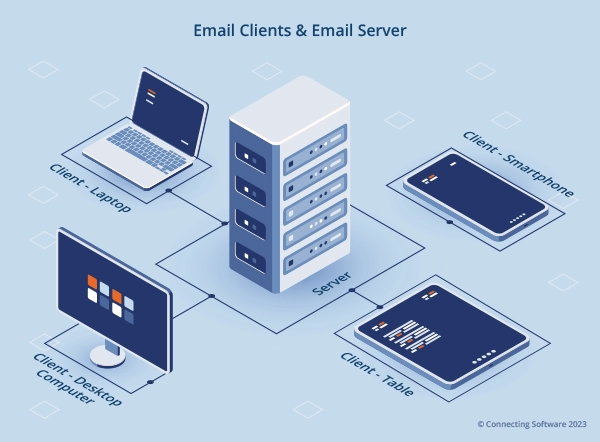
Even when considering a single email account, you can still use multiple e-mail clients. Why? Well, multiple email clients allow you to access and manage emails from different devices or platforms. For example, you could use a web-based email client to access your email from a computer, and a mobile email client to access your email from a smartphone.
Account to Account Email Synchronization With Third Party Tool
Why Synchronize Different Email Accounts?
If you have more than e-mail account, synchronization will allow you to access all of your email messages from a single location. To achieve this, your e-mail client (for example, Microsoft Outlook) is not enough - you will need to use an extra tool. In this article, the tool we will use is CB Exchange Server Sync. This is a paid tool, but with a free trial available.
If you are wondering if it is worth going for an extra tool and the email synchronization, let me go through the advantages with you:
- Convenience
Synchronizing your email accounts means you only have to log in to one place to check your email, calendar, and tasks. This can save you a lot of time and hassle.
- Efficiency
Having all of your email messages in one place makes it much easier to scan through them and find what you are looking for, especially you have a lot of email messages.
- Organization
It can be difficult to keep track of all of your calendar appointments, tasks and contact details if they are spread out over multiple accounts.
Introduction to CB Exchange Server Sync: A Powerful Tool for Email Synchronization
Let’s now go over the tool we mentioned earlier: CB Exchange Server Sync by Connecting Software. In short, what this tool does is facilitate the synchronization of email accounts between two Exchange servers or between an Exchange Server and Gmail / Google Workspace accounts. It is a reliable and efficient solution especially useful for businesses to keep their email accounts in sync.
Here are some of the main features and capabilities of CB Exchange Server Sync:
| Description | |
| Enterprise Ready | To do a sync, you need at least two email accounts (one sync pair). But the real game-changer is that this tool allows for as many sync pairs as you need and makes it really easy to set up all these pairs, automating the setup as much as possible. In fact, it's currently handling more than 140,000 sync pairs in a live setup. |
| Real-time synchronization | Changes made to one account are reflected in the other account in real time and without the need for user interaction. This can be a huge time-saver for businesses that need to keep their email and calendars up to date. |
| Flexible synchronization options | You can choose what to sync or migrate (Calendars, Contacts, Tasks, Email folders and messages, Public folders); Supports complex scenarios like cross-tenant or cross-domain; Bidirectional or one-way with conflict resolution and many other options. |
| Easy to use | Synchronization with CB Exchange Server Sync is straightforward and only involves configuring the tool. This means that even users with no experience in programming can use it to synchronize their email accounts. |
| Email clients supported | Works server-side with Outlook (Exchange Server, Microsoft 365 / Office 365) and Gmail (Google Workspace). |
How To Sync Two Email Accounts Using CB Exchange Server Sync Step-By-Step
The easiest way to get started with syncing email accounts using CB Exchange Server Sync is to start with a single sync pair (that is with two e-mail accounts) and then choose the instructional video that is closely related to what you want to do:
- Sync Outlook Calendars 3:20
- Sync Outlook Emails 3:05
- Sync Outlook Contacts 3:01
Once you have a general idea of the process with these shorter videos, you can get into the details with further videos:
- How to Create a Sync Pair using Sign-in with Microsoft option in CB Exchange Server Sync 1:56
- How to Create a Sync Pair using the Service User in CB Exchange Server Sync 2:42
- How to synchronize calendars, contacts, tasks, and emails between multiple exchange mailboxes 4:10
- Synchronize your calendar between Gmail/G-suite and Exchange 1:36
These videos provide a step-by-step guide, making the process simple and straightforward, even for those not familiar with the tool.
Real-life Use Cases and Success Stories
CB Exchange Server Sync has been out on the market for many years and there are several real-life use cases that you can read about online. We recommend the CB Exchange Server Sync Success Stories page as a good starting point. In this page you can read about:
- A French real estate company was able to synchronize the calendar seamlessly and effortlessly between their existing Exchange and their new Gmail accounts.
- A VIP customer in Monaco was able to migrate to a new Exchange server with no stress or downtime and also synchronize calendars and contacts between specific users.
- A non-profit organization in Pennsylvania (USA) was able to have their calendar appointments available in a public folder which is accessible to specific people.
You can also read some stories on the Microsoft website. For example this Microsoft story is about a Canadian financial institution used CB Exchange Server Sync and an add-on to synchronize and filter e-mail and calendar items according to very specific rules and strict security constraints.
In addition to the powerful features of CB Exchange Server Sync, from version 6.0 a new add‑ on called CB GAL Sync is available. This was specifically designed to simplify the synchronization of Global Address Lists (GAL) between two Microsoft Exchange Servers.
Conclusion
In conclusion, email synchronization is a vital aspect of modern communication and email management. First, you need to be clear on whether it's synchronizing email accounts from servers to clients or synchronizing multiple email accounts into a single location.
The importance of synchronizing multiple email accounts lies in the ability to centralize access to emails, calendars, and tasks allowing individuals to save time and effort, efficiently manage their digital lives, and stay on top of their tasks and appointments. It promotes productivity by enabling users to easily search and navigate through their email messages, even when dealing with large volumes of correspondence in each account.
CB Exchange Server Sync, developed by Connecting Software, offers powerful features and capabilities for email synchronization. With the ability to set up multiple sync pairs and real-time synchronization, the tool ensures that changes made in one account are reflected in the other, keeping email accounts up to date. The flexible synchronization options allow users to customize their synchronization preferences, syncing specific folders or choosing one-way or two synchronization.
With a track record of reliability, CB Exchange Server Sync proves to be a valuable asset for businesses and individuals seeking efficient email synchronization solutions.
References - Sources and Further Reading
Statista report - Number of sent and received e-mails per day worldwide from 2018 to 2028



About the Author

By Ana Neto, technical advisor at Connecting Software.
“I have been a software engineer since 1997, with a more recent love for writing and public speaking. Do you have any questions or comments about this article? I would love to have your feedback, leave a comment below!"
Comments 2
No me llega mi correo
Author
As you want to synchronize one account from the server to the client (as described above in the section “Email Synchronization: Email Client vs Email Server”) and that seems not to be working, the first thing to try is to use a different client and see if that works. You can try a web client or installing a different e-mail client like Mozilla Thunderbird. Good luck!