
The cloud was supposed to simplify everything. And for most workloads, it did. For those working in a Microsoft environment, Microsoft 365 promised, and largely delivered, a world where email, calendars, and collaboration just worked, and there was no need to think of the servers supporting that.
But the world is changing. Trade tensions and data sovereignty disputes have seen to that. And outages are no longer edge cases.
In January 2026, Microsoft 365 went down globally. Email stopped. Outlook wouldn't load. Calendar access vanished. The blast radius wasn't one company. It was every tenant on the platform, all at once.
For every organization caught without a fallback, business continuity was threatened. And for organizations operating under regulations like DORA or NIS2, that is no longer just an operational problem. It is a regulatory compliance failure, carrying the risk of fines, mandatory reporting, and potential supervisory intervention.
The Regulatory Wake-Up Call: "The Vendor Was Down" Is No Longer an Answer
Across multiple jurisdictions and industries, regulators are raising the bar on what business continuity actually means:
- DORA (fully enforced January 2025): Financial sector organizations must maintain and regularly test documented ICT continuity plans, ensure systems remain operational during disruptions, and actively mitigate risks from third-party cloud providers. Having an SLA in place is not considered adequate mitigation.
Supervisory authorities have the power to impose remediation plans, conduct additional audits, restrict certain business activities, or increase oversight if organizations are found non-compliant.
- NIS2: extends near-identical obligations to energy, health, transport, public administration, and digital infrastructure. Email systems are explicitly in scope. Penalties reach 2% of global annual turnover. The burden of proof sits with the organization, not the regulator.
Regulators can mandate corrective action, require detailed evidence of compliance, and, in serious cases, restrict or prohibit business operations related to essential or important services until compliance is restored.
- GDPR and data sovereignty: Email data held exclusively with US-headquartered cloud providers is subject to US CLOUD Act compelled disclosure, regardless of where servers are physically located. For European organizations in regulated sectors like healthcare, legal services, and clinical research, this represents a real and ongoing compliance exposure.
Regulators expect organizations to demonstrate control over data residency and legal jurisdiction, a guarantee no hyperscaler can fully make on behalf of your organization.
These are not the only regulations that require business continuity. Depending on your sector and geography, many other frameworks carry similar obligations:
|
Regulation |
Scope |
BCP Requirement |
|
HIPAA |
US healthcare and business associates |
Contingency planning is an explicit Security Rule requirement; email servers are named in scope |
|
FISMA / NIST SP 800-53 |
US federal agencies and contractors |
Full contingency planning control family; covers all information systems, including communication infrastructure |
|
FDA 21 CFR Part 11 / EU Annex 11 |
Pharma, biotech, medical devices globally |
Annex 11 explicitly requires documented continuity arrangements for systems supporting regulated processes |
|
APRA CPS 230 |
Australian banks and insurance companies |
Enforced from July 2025, CPS 230 requires a credible, regularly tested BCP covering all critical operations, and explicitly extends obligations to third-party service providers, including cloud vendors |
|
SOX |
US publicly traded companies |
Section 404 IT controls implicitly require availability and recovery provisions for systems supporting financial reporting, including email |
|
GLBA (FTC Safeguards Rule) |
US financial institutions |
Updated 2023 rule explicitly requires business continuity provisions as part of the information security program |
|
NYDFS 23 NYCRR Part 500 |
NY-licensed financial services firms |
Requires business continuity and disaster recovery protocols, including annual testing; covered entities cannot delegate compliance accountability to third-party vendors |
The common thread across all of these frameworks is the same: the organization is accountable for continuity, not the vendor. "Our cloud provider went down" satisfies no auditor in any of these jurisdictions.
The Solution: Building a Resilient Active-Standby Architecture
The answer is not abandoning M365. It is extending it. By adopting an active-standby architecture, you can achieve resilience and business continuity without disrupting your end users.
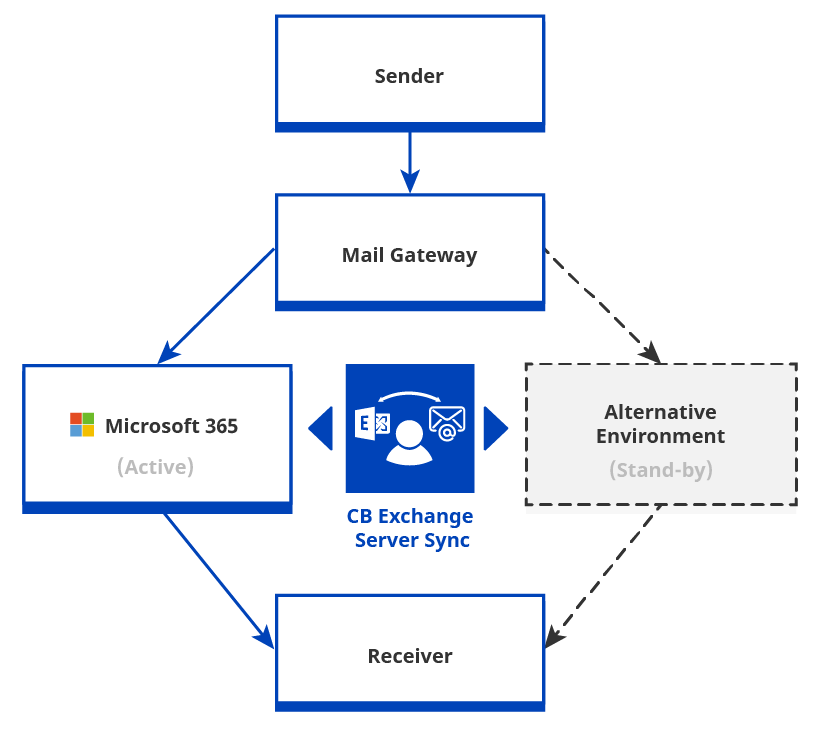
In such architecture, one environment handles 100% of live traffic in the normal state. A second environment maintains continuous parity and assumes traffic when the primary fails. Naturally, the failover flow needs to be planned and tested beforehand, so that it is auditable and actionable when needed.
There are three key aspects that act as the foundation of an active-standby architecture, as seen in the diagram below:
1 – An automated synchronization tool, such as CB Exchange Server Sync, to maintain bi-directional mail and calendar parity across platforms while keeping you in full control of your data location.
2 – A mail gateway, such as Postfix, to provide a controlled buffer so you can re-route email to secondary endpoints during an outage.
3 - Pre-created email client profiles, to quickly switch users to those secondary endpoints. All end users must have pre-staged profiles for both systems to avoid "First Run" configuration delays. We recommend using classic Outlook as the email client or ensuring all users are trained to use OWA as the “zero setup” fallback.
 (opens in a new tab)
Active-Standby Architecture Diagram
For the alternative environment that you have in stand-by, you can consider the two options below, depending on your organization's infrastructure preferences and sovereignty requirements.
Option 1: M365 + On-Premises Exchange
Best for: organizations with data sovereignty requirements, regulated sectors, EU-based operations, or existing on-premises infrastructure.
How it works:
- On-premises Exchange is used as the standby alternative environment and is hosted in the organization's own data center.
- CB Exchange Server Sync maintains continuous bi-directional synchronization of mail, contacts, and calendars between Microsoft 365 and on-prem Exchange. All data becomes identical in both systems.
- In the normal state, Microsoft 365 handles all live traffic.
- On failover, mail routes automatically through on-premises Exchange.
What the failover flow looks like for the end user:
- Outlook desktop, mobile, and OWA connect to whichever environment is available.
- The interface is identical (no new system to learn, no emergency procedure to follow).
- Any mail created during the outage syncs back to Microsoft 365 automatically on recovery.
Data sovereignty advantages:
- Email data at rest lives in the organization's own datacenter, under their own jurisdiction, on hardware they control.
- Full chain of custody and auditability
- Direct, demonstrable answer to DORA third-party risk provisions
What auditors see: A live, running, testable standby environment. Not a policy document. Not an SLA reference. Proof of continuity.
Option 2: M365 + Google Workspace
Best for: organizations preferring full cloud redundancy, those already evaluating vendor diversification, or those without on-premises infrastructure (or a team to consider having one).
How it works:
- Google Workspace is used as the standby alternative environment. It is a separate vendor infrastructure, a different datacenter footprint, and a different failure surface.
- A mail gateway, such as Postfix, centralizes ingress and manages routing, controlling the failover flow independently of MX propagation
- CB Exchange Server Sync maintains continuous bi-directional mail and calendar parity with Google Workspace silently in the background. You will have the same data in both systems.
- In the normal state, Microsoft 365 handles 100% of live traffic.
- On failover, a semi-automatic routing flip at the gateway redirects traffic to Google Workspace.
- This avoids MX brain-split (the split-routing conflict that occurs when MX record changes propagate inconsistently across DNS resolvers during a live transition).
What the failover flow looks like for the end user:
- Users familiar with Outlook can use it via mail connectors during the failover period or can switch to the Gmail Web or Gmail Mobile interfaces.
Data sovereignty note:
This option is convenient because it avoids the need to own or maintain infrastructure, but it does not provide the same on-premises ownership guarantee as Option 1. Data sovereignty depends on Google Workspace deployment configuration and region settings. For organizations with strict jurisdiction requirements, Option 1 is a stronger choice.
What Both Options Share
Regardless of which deployment pattern fits the organization, the underlying architecture delivers the same guarantees:
- Redundancy that is invisible to end users and visible to auditors
- Active-Standby Architecture with continuous synchronization. No cold standby, no backup restore, no manual data recovery
- A failover flow that is planned and tested before it is needed
The Gain: From Compliance Cost to Competitive Architecture
- Audit-readiness as a default state: when a DORA or NIS2 examiner asks how the organization ensures email continuity, the answer is a live, running system, not a policy document referencing a vendor SLA
- Sovereignty as a commercial differentiator: In the EU, many public sector and critical infrastructure contracts require in-country or EU-only data processing. In Australia, APRA CPS 230 extends that accountability directly to third-party providers. In the US, frameworks like FBI CJIS and NYDFS require organizations — not their vendors — to maintain strict control over sensitive data. In all three cases, organizations that can demonstrate data sovereignty are winning mandates that cloud-only competitors cannot bid on.
- Zero-trust, operationalized for email: the most resilient BCP posture assumes any system can fail and designs accordingly. The active-standby architecture with continuous synchronization presented above is what that assumption looks like when applied to the workload organizations can least afford to lose.
- Investment that stays ahead of the curve: organizations investing in hybrid email resilience today are taking a proactive stance, positioning themselves ahead of regulatory, operational, and market demands instead of reacting after-the-fact.
Final Thoughts
The cloud was supposed to simplify everything. For most workloads, it succeeded. But simplicity without resilience is just fragility with a better name.
When regulators come calling, or when a major outage brings operations to a halt, do you think “we trusted our vendor’s SLA” will be an accepted answer?
The era of blind faith in a single cloud vendor's uptime is over, especially for critical business systems like email. Email is the one communication channel that works regardless of what platform your counterparty uses. That is probably why it is at the core of almost every business-critical interaction. It is crucial for every customer relationship, every regulatory obligation, every deal in motion. When it fails, everything downstream fails with it.
For organizations relying previously solely on Microsoft 365, building a live, testable, dual-environment architecture isn’t just technical prudence. It’s now regulatory common sense. Whether that means adding an on-prem Exchange standby for complete sovereignty, or cloud-to-cloud failover with Google Workspace for vendor diversity, the point is the same.
Resilience must be designed from the beginning, so that when simplicity fails, continuity doesn't.
Want to know more about this type of Active-Stanby Architecture and how CB Exchange Server Sync could work in your scenario? Secure a dedicated free consultation session with our technical experts:

Glossary
APRA CPS 230 - Australian Prudential Regulation Authority, Prudential Standard CPS 230
DORA - Digital Operational Resilience Act
FDA 21 CFR Part 11 - U.S. Food and Drug Administration, Title 21 Code of Federal Regulations Part 11
FISMA - Federal Information Security Management Act
ICT - Information and Communication Technology
NIS2 – European directive on network and information systems (NIS)
SLA – Service Level Agreement
Keep on reading about Google Workspace
About the Author

By Ana Neto, technical advisor at Connecting Software.
“I have been a software engineer since 1997, with a more recent love for writing and public speaking. Do you have any questions or comments about this article? I would love to have your feedback, leave a comment below!"
