Microsoft 365 Email Continuity
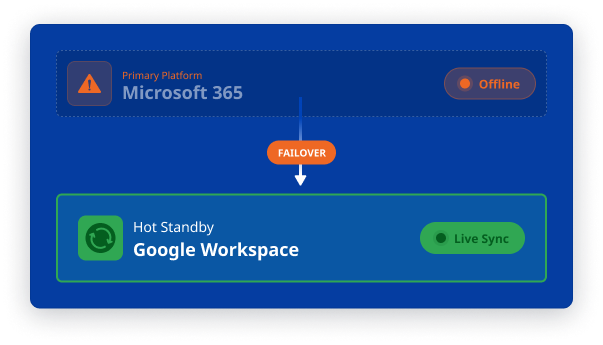
Reduce Microsoft 365 dependency with a continuously synchronized Exchange Server or Google Workspace hot standby
48
Microsoft 365 incidents recorded since January 2025
24h
Duration of a Nov 2026 Exchange Online and Outlook disruption
75%
of recorded incidents lasted longer than one hour
Sources: StatusGator Microsoft 365 Suite outage history for incident count and duration analysis; Article on the Nov 2026 incident.
Backup Is Not Continuity

Email Backup
✓ Recovers mailbox data
✓ Requires restore
✓ Protects against data loss
Email Continuity
Maintains communication & productivity
Uses active alternative environment
Protects operational capability
The question is not whether mailbox data can be recovered. It is how quickly users can communicate again and whether your organization can afford the downtime while they can't.
What are your email continuity requirements?
A defensible email cdontinuity plan starts with clear operational requirements. These requirements will determine which architecture and standby environment are appropriate, the required data scope, and how failover and failback should work.

Downtime
How long can users remain without email and calendars?

Scope
Are email inboxes sufficient, or are calendars, contacts, tasks, shared mailboxes, and files also required?

Data recency
How current must the standby data be?

Independence
Must the standby operate outside the primary cloud provider?

Failback
How quickly must changes made during the outage return to Microsoft 365?

Compliance
What security, retention, and regulatory controls (encryption, access policies, logging, legal hold) must be met?
Two approaches to email continuity
Choose between two independent continuity architectures for Microsoft 365: an on-premises Microsoft Exchange standby and a Google Workspace standby.
Both are hot standby environments kept current through continuous synchronization and support controlled failback, returning changes to Microsoft 365.
Approach #1
On-premises Microsoft Exchange Hot Standby
Sync solution: CB Exchange Server Sync
Main strength: Complete infrastructure control
Main limitation: Requires infrastructure and administration
Supported standby versions: Microsoft Exchange SE, 2019, 2016, 2013
Approach #2
Google Workspace Hot Standby
Google Workspace provides a standby platform completely outside the Microsoft ecosystem. By using synchronization, you turn this platform into a hot standby and reduce dependency on a single cloud vendor.
The design must account for user provisioning, address mapping, mail routing, licensing, and differences between Microsoft 365 and Google Workspace.
Sync solution: CB Exchange Server Sync for Google Workspace
Main strength: Cross-cloud independence
Main limitation: Requires platform and account mapping
Supported standby versions: Gmail, Google Calendar, Google Tasks
CB Exchange Server Sync for Google Workspace is the solution that provides the email, calendar, contact, and task synchronization layer for the Google Business Continuity Plus SKU.
Separate Connecting Software solutions can extend continuity by synchronizing SharePoint and OneDrive files with Google Drive, and Microsoft Teams messages with Google Chat.
Built for Enterprise Scale

Failover and Failback
Before the outage synchronize
Keep mailbox and calendar data up to date in the standby environment by synchronizing with the hot standby environment.
Failover
Redirect mail flow and give users access to the alternative hot standby environment.
During the outage - Continue working
Users communicate via email and update calendars during the disruption using the hot standby environment.
Failback
Synchronize outage-period activity into Microsoft 365 and return users on a flexible but controlled schedule.
Compliance and due diligence
NIS2, DORA, and similar frameworks do not select a specific continuity architecture. They require the organization to assess risk, maintain appropriate resilience and demonstrate that its controls work.
These are the questions NIS2 and DORA expect you to be able to answer. Where does your organization stand on each?
FAQ
If you can't find the question you are looking for in this Frequently Asked Questions section, please reach out to us.
Interested? See more:
Trusted & Certified