
TL;DR
Migrating from legacy aviation systems such as Quantum Control, CORRIDOR, or Pentagon 2000SQL to AvSight, a modern cloud platform, is not just a system migration. It is also a document migration that can push monthly file storage costs up fast.
Connecting Software's Document Extractor avoids the storage cost surge with a hybrid cloud architecture that automatically extracts files to Microsoft SharePoint, while maintaining live, clickable links inside the AvSight UI.
This cuts per-TB storage costs from $300–$1,200/month down to $0–$200/month, with no change to how your team works in AvSight.
Talk to us about reducing your migration's storage footprint with Document Extractor →
The Problem: Document Migration Is the Hidden Cost of System Migration
Every part record, work order, and transaction in your legacy aviation system has paperwork attached to it, and that paperwork doesn't get lighter just because the platform underneath it changes. Years of FAA Form 8130-3s and, where applicable, EASA Form 1s, along with related traceability, maintenance, and commercial records, need to remain accessible from the new system.
In aviation, traceability is key: a component release certificate, trace record, or maintenance record is only useful if it remains linked to the part it documents and can be retrieved on demand, sometimes years or decades later.
So most teams take the obvious path during migration from a legacy system to AvSight: upload every document into the new AvSight platform and be done with it. That's where the cost problem starts. AvSight runs natively on Salesforce, and Salesforce's storage model wasn't designed to be a document archive. Prices work accordingly, which is why extra file storage is expensive. Even with negotiated volume discounts, is typically from $300 to $1,200 per month per TB.
For a legacy aviation dataset spanning years, and sometimes multiple terabytes of trace and certification documents alone, that's not a one-time migration expense. It's an expense that compounds monthly for as long as the platform is in use.
The Fix: A Hybrid Cloud Architecture Powered by Document Extractor
The fix is a hybrid cloud architecture that automatically extracts files to Microsoft SharePoint ($0 to $200 per month per TB, depending on contract terms, licensing, available pooled capacity, and region) while maintaining live, clickable links inside the AvSight UI. As AvSight runs natively on Salesforce, Connecting Software's Document Extractor is able to do just that: it sits between AvSight/Salesforce and SharePoint, moving file content out of Salesforce storage while keeping every reference to that file fully intact inside AvSight.
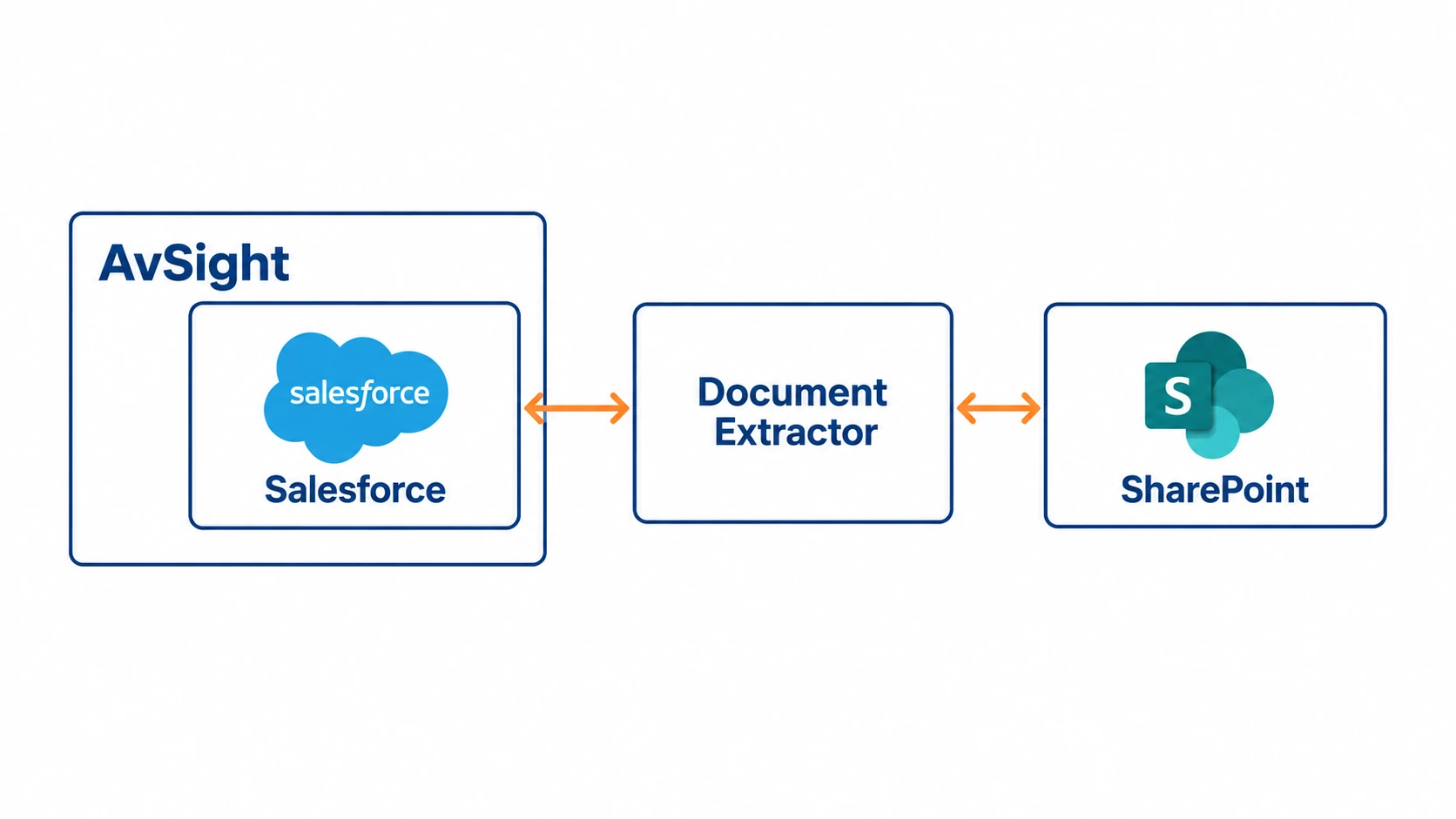
In practice, that means:
- Documents attached to AvSight records are automatically moved to SharePoint.
- A live, clickable link is maintained inside the AvSight record, so the document is one click away, the same as if it were stored natively.
- You can configure extraction to run in the background for existing files, so you offload historical files without a manual re-upload or re-linking project.
The important part is that the end-user workflow doesn't change. A technician or records clerk pulling up a report in AvSight still clicks the same link, sees the same document, the exact same way. What changes is where the bytes actually live and what you pay to store them.
Nonetheless, with the files in SharePoint, it is possible to provide access to the files through SharePoint for team members who do not have access to Salesforce.
Results
Cost-wise, the difference is stark: SharePoint runs $0 to $200 per month per TB depending on contract terms, licensing, available pooled capacity, and region, against $300 to $1,200 per month per TB for equivalent Salesforce Files storage. For organizations that already carry SharePoint or Microsoft 365 licensing, the pooled storage that comes with those licenses often absorbs much or all of the incremental cost, pushing the effective rate toward the low end of that range, sometimes to zero.
For a team migrating several terabytes of legacy trace and certification documents, that's the difference between an ongoing five-figure annual storage bill and a fraction of that, while the people actually using AvSight day-to-day notice nothing different at all.
Further advantages come from:
- Team members or externals who are not licensed as AvSight/Salesforce users can also access the documents in SharePoint, if sharing and configuration are done accordingly.
- Collaboration becomes easier on Microsoft 365 documents, as SharePoint supports it in an intuitive and practical way.
If you're planning — or midway through — a migration to AvSight and want to know how to save on your Salesforce file storage bill before the first invoice arrives, Connecting Software can show you what Document Extractor would save.
Talk to us about reducing your migration's storage footprint with Document Extractor →
About the Author

By Ana Neto, technical advisor at Connecting Software.
“I have been a software engineer since 1997, with a more recent love for writing and public speaking. Do you have any questions or comments about this article? I would love to have your feedback, leave a comment below!"