

SN Groupe migrated user mailboxes from on-premises Microsoft Exchange to Microsoft 365, while keeping its Saleslogix CRM calendar workflows intact.
To achieve this, they deployed CB Exchange Server Sync in a self-hosted setup, which bidirectionally synced on-prem Microsoft Exchange with Exchange Online, so there was no need to replace the CRM or rebuild how teams worked.
“The solution met both our technical and functional requirements, the deployment went smoothly, and the Connecting Software team proved to be available and responsive”
– - Stéphane Nardo, Technical director at SN Groupe
Customer: SN Groupe – Services Network Groupe
Activity: IT services
Headquarters: Montpellier, France
Challenge: Migrate from an on-premises Exchange server to Microsoft 365 while retaining calendar synchronization with the on-premises Exchange Server and the on-premises CRM
Solution: CB Exchange Server Sync, deployed in SN Groupe’s self-hosted environment
Result: Reliable bidirectional calendar synchronization, uninterrupted business processes, and a smooth transition to Exchange Online
The Challenge: Migrating From On-prem Exchange to Microsoft 365 Without Disrupting Existing Processes
In 2024, SN Groupe set out to migrate its email infrastructure from an on-premises Microsoft Exchange server to Microsoft 365. We sat down with Stéphane Nardo, the company's technical director, to learn how the migration affected his organization and how his team tackled the challenge.
"We were able to complete our migration to Microsoft 365 without replacing our on-premises CRM or losing calendar synchronization," he says.
He goes on to explain, “Our on-premises CRM included a module that provided bidirectional calendar synchronization with our on-premises Exchange server. However, this module was not compatible with Exchange Online and Microsoft 365.” Moving its mailboxes to Microsoft 365 would therefore have required SN Groupe to fully redo an important part of its existing workflow.
Calendar synchronization played a central role in the teams’ day-to-day activities. Employees needed appointments and events entered in the CRM to remain available in Outlook and changes made in Outlook to be reflected in the CRM. This supported essential processes such as work scheduling, calendar access, and invoicing.
SN Groupe consequently needed a solution that would allow it to modernize its email infrastructure without replacing its CRM or disrupting the way employees worked.
“We needed an intermediary solution that would allow us to migrate our mailboxes to Microsoft 365 while maintaining calendar synchronization between our on-premises CRM and our users’ Outlook calendars.”, Stéphane Nardo points out.
Finding the Right Synchronization Solution
SN Groupe discovered Connecting Software while researching solutions compatible with its technical environment.
After the initial contact, the company was quickly able to speak with the Connecting Software team and schedule a product demonstration. Having a demo with an expert from Connecting Software who could answer their questions was crucial, as Stéphane Nardo highlights: “These discussions enabled us to confirm that the solution met both our technical and functional requirements.”
SN Groupe also evaluated other products available on the market, including CiraSync. Connecting Software’s solution stood out because it provided the combination SN Groupe needed:
- Support for a self-hosted deployment
- Bidirectional calendar synchronization
- Ability to synchronize calendars without introducing unnecessary functionality
- Compatibility with their version of on-premises Exchange and Microsoft 365
- Pricing aligned with the company’s requirements
Compatibility with their version of on-premises Exchange was particularly important because this meant that SN Groupe did not have to modify its established CRM integration with Exchange. Although Microsoft 365 migration had become necessary, the company chose to keep the existing on-prem Microsoft Exchange and its established CRM processes operational for an extended period.
The Solution: Connecting an On-premises CRM with Microsoft 365
SN Groupe implemented CB Exchange Server Sync in its own environment. The self-hosted solution acts as an intermediary between the on-premises Microsoft Exchange Server (integrated with the on-premises CRM) and the calendars associated with users’ Microsoft 365 mailboxes.
How It Works
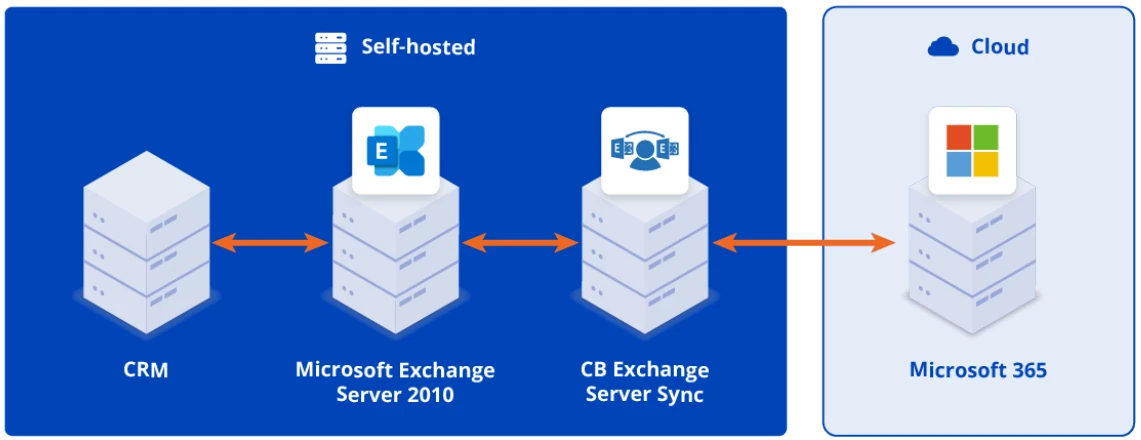
The synchronization runs on the following mechanics:
- Sync method: Synchronization is polling-based, and SN Groupe's IT team configured an interval that best met the organization's operational and performance requirements.
- Calendar coverage: CB Exchange Server Sync supports multiple calendars per user, including shared, resource/room, and delegated calendars.
- Data synced: It synchronizes all appointment fields, including attendees and categories, and supports recurring events.
- Scope control: SN Groupe could also define a start date so that only events from that date onward would be synchronized.
- Direction: Appointments and events synchronize in both directions: activities created or updated in the on-premises CRM are reflected in the Microsoft 365 calendar the users see in Outlook, and calendar changes made in Outlook are synchronized back to the CRM.
- Conflict handling: If changes are made in both on-premises CRM and Outlook, conflicts are resolved according to the rules defined in the configuration.
With this bidirectional synchronization running, employees continue working in the same way as before, even though the underlying email infrastructure has moved from an on-premises Exchange server to Exchange Online.
Stéphane Nardo describes the solution as follows:
“Connecting Software provides a solution that enables bidirectional calendar synchronization between our on-premises CRM and the calendars of our Microsoft 365 mailboxes. It allowed us to retain our existing CRM while moving our email infrastructure to the cloud.”
The Result: A Smooth Migration With Ongoing Synchronization
The implementation enabled SN Groupe to complete its Microsoft 365 migration without changes to its existing CRM integration with Exchange, or giving up calendar synchronization.
For employees, the transition caused no disruption. Teams continue to plan their work and access appointments through their familiar Outlook calendars. Processes that depend on accurate scheduling information, including activity management and invoicing, remain supported.
For the business, the project achieved two goals that might otherwise have conflicted: modernizing the email infrastructure while maintaining its established CRM system.
“The most significant change is that we were able to complete our migration to Microsoft 365 without replacing our on-premises CRM or losing calendar synchronization.”, Stéphane Nardo concludes.
Responsive Support Throughout the Project
SN Groupe also highlighted the support it received during implementation and after deployment. The Connecting Software team remained available throughout the process and responded promptly when assistance was required.
“A big thank you to your support team, which was very efficient and professional.”, Stéphane Nardo notes.
When asked how likely it would be to recommend Connecting Software and the solution to a colleague or peer, he gives a score of 9 out of 10 and explains:
“The solution effectively meets our needs, the deployment went smoothly, and the Connecting Software team proved to be available and responsive, both during implementation and when handling our support requests.”
Preserving Existing Systems While Moving Forward
SN Groupe’s experience demonstrates that migrating to Microsoft 365 does not necessarily require replacing every application connected to an on-premises Exchange Server.
With CB Exchange Server Sync providing the bridge between the on-premises CRM and Exchange , SN Groupe modernized its email environment while preserving the calendar workflows its teams rely on. The result was a smooth transition, continued productivity, and a practical path toward future modernization.
Need to preserve calendar synchronization during an Exchange Online migration?
Key Questions Answered
Why couldn't SN Groupe go with a simple Microsoft 365 migration?
Their CRM module synced calendars with on-premises Exchange, and it wasn't compatible with Exchange Online and Microsoft 365, so a one-off migration would have broken that integration.
What solution did SN Groupe choose?
They deployed CB Exchange Server Sync from Connecting Software in a self-hosted setup, acting as an intermediary that bidirectionally syncs their on-premises Exchange (integrated with an on-premises CRM) with Microsoft 365.
Why did they choose Connecting Software over other options like CiraSync?
Connecting Software's solution supported self-hosted deployment, bidirectional sync, compatibility with their specific on-premises Exchange version and Microsoft 365, and pricing that matched their requirements without adding unnecessary functionality.
What was the impact on employees and day-to-day operations?
There was no disruption. Employees kept working exactly as before, using Outlook calendars synced with the CRM, and processes like activity management and invoicing continued uninterrupted.
How likely was SN Groupe to recommend Connecting Software?
Stéphane Nardo, Technical Director at SN Groupe, gave a score of 9 out of 10, citing a smooth deployment and a responsive, professional support team.